
Toyota Sienna 2010-2026 Owners Manual: Displaying a Bluetooth® device details
You can confirm and change the registered device details.
Bluetooth® device registration status
- Display the “Bluetooth* Setup� screen. *: Bluetooth is a registered trademark of Bluetooth SIG, Inc.
- Select the device.
- Select “Device Info�.
- Following screen is displayed:
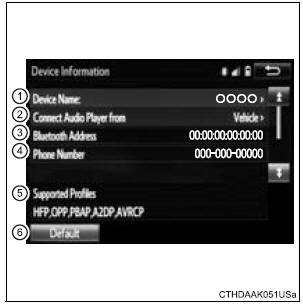
- Change device Name
- Change connection method
- Bluetooth® Address
- Display your telephone number The number may not be displayed depending on the model of phone.
- Compatibility profile of the device
- Restore default settings
Changing connection method
- Select “Connect Audio Player from�.
- Select “Vehicle� or “Device�.
“Vehicle�: Connect the audio system to the portable audio player.
“Device�: Connect the portable audio player to the audio system
 Connecting a Bluetooth®
device
Connecting a Bluetooth®
device
Up to 5 Bluetooth® devices (Phones [HFP] and audio players
[AVP]) can be registered.
If more than 1 Bluetooth® device has been registered, select
which device to connect to.
Press the “SE ...
 Detailed Bluetooth®
system settings
Detailed Bluetooth®
system settings
You can confirm and change the detailed Bluetooth® settings.
How to check and change detailed Bluetooth® settings
Display the “Bluetooth* Setup� screen.
Select “System Settings�.
T ...
Other materials:
Power Seat Motor Circuit
DESCRIPTION
When the power seat control switch is operated, a command signal is sent to
the position control ECU
and switch assembly (power seat control switch and ECU). The front power seat
switch then controls the
appropriate seat motor as needed. This memory system does not use a seat
po ...
Removal
1. REMOVE REAR WINDOW SIDE GARNISH
ASSEMBLY
2. REMOVE REAR DOOR WINDOW FRAME SUBASSEMBLY
3. REMOVE SIDE TRIM BOARD COVER REAR
4. REMOVE REAR DOOR TRIM BOARD SUBASSEMBLY
5. REMOVE REAR DOOR GLASS RUN
6. REMOVE SLIDE DOOR WINDOW ASSEMBLY
7. REMOVE REAR DOOR GLASS WEATHERSTRIP
Put pro ...
Problem symptoms table
Vehicle stability control system:
TERMINALS OF ECU
1. Terminal of ECU
(*1): Models with dynamic laser cruise control
(*2): 2WD model
2. Terminal Inspection
(a) Disconnect the connector and measure the voltage or resistance on the wire harness side.
HINT: Voltage cannot be measured wit ...
