
Toyota Sienna 2010-2026 Owners Manual: Detailed Bluetooth® system settings
You can confirm and change the detailed Bluetooth® settings.
How to check and change detailed Bluetooth® settings
- Display the “Bluetooth* Setup� screen.
- Select “System Settings�.
- The following screen is displayed:
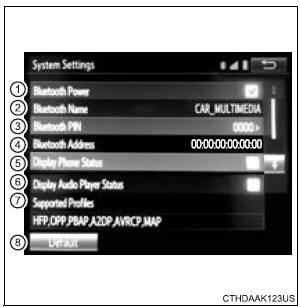
- Bluetooth* Power on/off You can change Bluetooth* function on/off
- Bluetooth* Name
- Change PIN-code
- Bluetooth* Address
- Display Phone Status Select to set the phone connection status display on/off.
- Display Audio Player Status Select to set the connection status display of the audio player on/off.
- Compatibility profile of the system
- Restore default settings
*: Bluetooth is a registered trademark of Bluetooth SIG, Inc.
Editing the Bluetooth* PIN
You can change the PIN-code that is used to register your Bluetooth® devices in the system.
- Select “Bluetooth* PIN�.
- Input a PIN-code, and select “OK�.
*: Bluetooth is a registered trademark of Bluetooth SIG, Inc.
 Displaying a Bluetooth®
device details
Displaying a Bluetooth®
device details
You can confirm and change the registered device details.
Bluetooth® device registration status
Display the “Bluetooth* Setup� screen.
*: Bluetooth is a registered trademark of Bluetooth S ...
 Bluetooth® Audio
Listening to Bluetooth® Audio
The Bluetooth® audio system enables the user to enjoy music
played on a portable player from the vehicle speakers via wireless
communication.
When a Bluetooth® d ...
Other materials:
Navigation Voice Circuit
DESCRIPTION
This circuit is used when the voice guidance in the navigation system is on.
WIRING DIAGRAM
INSPECTION PROCEDURE
1 CHECK HARNESS AND CONNECTOR (RADIO AND NAVIGATION ASSEMBLY - STEREO
COMPONENT AMPLIFIER)
Disconnect the radio and navigation assembly connector
R13 and s ...
Installation
1. INSTALL FRONT SHOULDER BELT ANCHOR
ADJUSTER ASSEMBLY
Install the front shoulder belt anchor adjuster
assembly with the bolt.
Torque: 42 N*m (430 kgf*cm, 31 ft.*lbf)
2. INSTALL CENTER PILLAR UPPER GARNISH
3. INSTALL FRONT SEAT OUTER BELT ASSEMBLY
NOTICE:
Do not disassemble ...
Removal
1. REMOVE WINDSHIELD WIPER MOTOR ASSEMBLY
2. REMOVE FRONT OUTER COWL TOP PANEL SUBASSEMBLY
3. DRAIN ENGINE COOLANT
4. REMOVE V-BANK COVER SUB-ASSEMBLY
5. REMOVE NO. 2 AIR CLEANER INLET
6. REMOVE NO. 1 AIR CLEANER INLET
7. REMOVE AIR CLEANER CAP SUB-ASSEMBLY
8. REMOVE AIR CLEANER CASE SUB-ASSE ...
