
Toyota Sienna Service Manual: Installation
1. INSTALL REAR AXLE HUB & BEARING ASSEMBLY LH
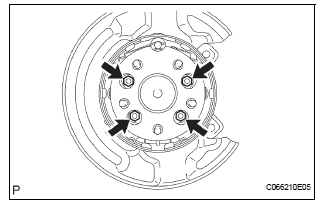
(a) Install the hub & Bearing assembly LH with the 4 bolts.
Torque: 56 N*m (571 kgf*cm, 41 ft.*lbf)
2. INSPECT BEARING BACKLASH (See page AH-16)
3. INSPECT AXLE HUB DEVIATION (See page AH-16)
4. CONNECT SKID CONTROL SENSOR WIRE
(a) Connect the connector
NOTICE: Do not twist the sensor wire when connecting it.
5. INSTALL REAR DISC
(a) Install rear disc for disc rear brake type.
6. INSTALL REAR BRAKE DRUM SUB-ASSEMBLY
(a) Install rear brake drum sub-assembly for drum rear brake type.
7. INSTALL REAR DISC BRAKE CALIPER ASSEMBLY LH
(a) Install the rear disc brake caliper assembly LH with the 2 bolts for disc rear brake type.
Torque: 88 N*m (900 kgf*cm, 65 ft.*lbf)
8. INSTALL REAR WHEEL Torque: 103 N*m (1,050 kgf*cm, 76 ft.*lbf)
9. CHECK ABS SPEED SENSOR SIGNAL
(a) ABS WITH EBD SYSTEM (See page BC-3).
(b) ABS WITH EBD & BA & TRAC & VSC SYSTEM (See page BC-72).
 Removal
HINT:
Replace the RH side by the same procedures as the LH side.
1. REMOVE REAR WHEEL
2. REMOVE REAR DISC BRAKE CALIPER ASSEMBLY
LH
(a) Removing the 2 bolts, separate the rear disc brake
caliper ...
 Rear axle hub and bearing (for 4wd)
COMPONENTS
...
Other materials:
Freeze frame data
1. FREEZE FRAME DATA
(a) Whenever a DTC is detected or the ABS operates,
the skid control ECU stores the current vehicle
(sensor) state as freeze frame data.
The skid control ECU stores the number of times
(maximum: 31) the ignition switch has been turned
from OFF to the ON position since th ...
Power window master
switch
Inspection
1. INSPECT POWER WINDOW REGULATOR MASTER SWITCH ASSEMBLY (w/ Jam
Protection Function)
Check the resistance between the terminals of the
switch when the switch is operated.
Standard:
AUTO (driver side) switch
Passenger side switch
Rear LH switch
Rear RH switch
...
Center Airbag Sensor Assembly Communication
Circuit Malfunction
DTC B1790 Center Airbag Sensor Assembly Communication
Circuit Malfunction
DESCRIPTION
The center airbag sensor assembly communication circuit consists of the
occupant classification ECU and
the center airbag sensor assembly.
DTC B1790 is recorded when a malfunction is detected in the center ...
