
Toyota Sienna Service Manual: Installation
1. INSTALL SHOCK ABSORBER ASSEMBLY REAR LH
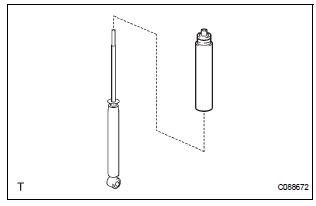
(a) Install the rear spring bumper No.1 LH to the shock absorber assembly LH.
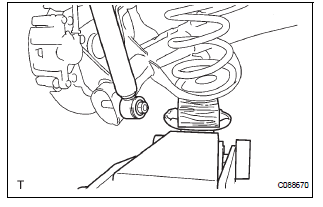
(b) Support the rear axle beam assembly with a jack.
(c) Install the rear shock absorber assembly rear LH, cushion retainer and nut to the rear axle beam.
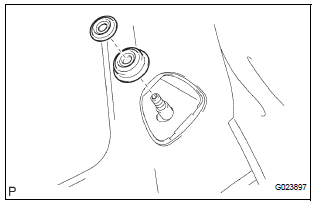
(d) Install the rear shock absorber cushion No.1 and rear shock absorber LH cushion retainer.
(e) Temporary tighten a new lock nut.
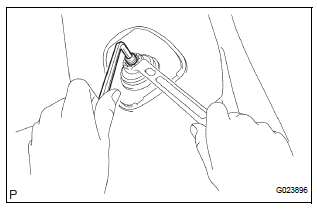
(f) Using a 6mm hexagon wrench to hold the piston rod, fully tighten the lock nut.
Torque: 30 N*m (310 kgf*cm, 22 ft.*lbf)
2. INSTALL REAR SHOCK ABSORBER CAP LH
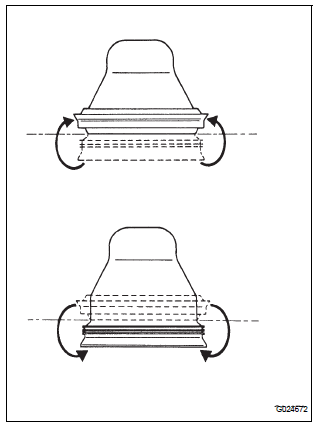
(a) Install the shock absorber cap LH as shown in the illustration.
(b) Install the shock absorber head cover.
3. INSTALL REAR WHEEL
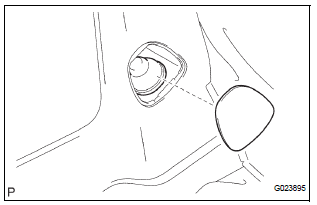
Torque: 103 N*m (1,050 kgf*cm, 76 ft.*lbf)
4. FULLY TIGHTEN SHOCK ABSORBER ASSEMBLY REAR LH
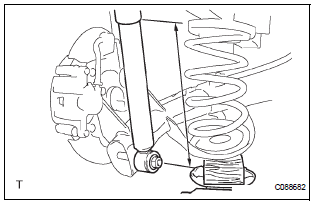
(a) Stabilize the shock absorber assembly rear LH.
If it is impossible to tighten the nut at this position, support the rear axle beam with a jack and load the rear compartment with a mass of approximately 90 kg (198 lb).
Length of shock absorber: 2WD DRIVE TYPE: 234 mm (9.22 in.) 4WD DRIVE TYPE: 258 mm (10.16 in.)
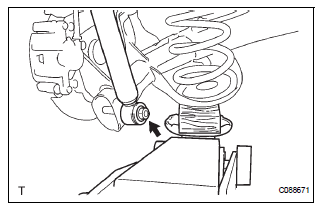
(b) Fully tighten the nut.
Torque: 115 N*m (1,173 kgf*cm, 85 ft.*lbf)
5. INSPECT REAR WHEEL ALIGNMENT
HINT: (See page SP-9)
 Inspection
1. INSPECT SHOCK ABSORBER ASSEMBLY REAR LH
(a) Push down and pull up the shock absorber rod, and
check that there is no unusual resistance or unusual
operation sound.
If there is any malfunc ...
 Disposal
1. DISPOSE OF SHOCK ABSORBER ASSEMBLY REAR LH
(a) Fully extend the shock absorber rod.
(b) Using a drill, make a hole in the cylinder as shown in
the illustration to discharge the gas inside ...
Other materials:
Control Module Performance
DESCRIPTION
The ECM continuously monitors its main and sub CPUs. This self-check ensures
that the ECM is
functioning properly. If outputs from the CPUs are different and deviate from
the standards, the ECM will
illuminate the MIL and set a DTC immediately.
The ECM also monitors the cru ...
Throttle / Pedal Position Sensor / Switch "D"
Circuit Range / Performance
DTC P2121 Throttle / Pedal Position Sensor / Switch "D"
Circuit Range / Performance
HINT:
This DTC relates to the Accelerator Pedal Position (APP) sensor.
DESCRIPTION
Refer to DTC P2120
MONITOR DESCRIPTION
The accelerator pedal position sensor is mounted on the accelerator pedal ...
Adjustment
HINT:
If the malfunction does not disappear by following the
procedure in ADJUSTMENT and the rear No. 2 seat
assembly needs to be replaced, do not disassemble the rear
No. 2 seat assembly.
1. ADJUST FRONT LEG
HINT:
Perform the following procedure if the inner leg does not
lock.
P ...
