
Toyota Sienna 2010-2026 Owners Manual: Locking/unlocking the sliding door from
Entry function (vehicles with a smart key system)
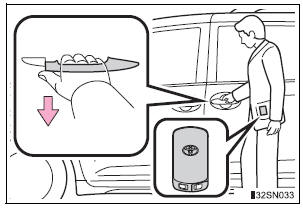
Carry the electronic key to enable this function.
Pull the handle to unlock all the doors.
There is no touch type sensor in slide door handle. You must pull the handle to activate the operation.
Wireless remote control
 Sliding doors
Vehicles without power sliding doors
The sliding doors can be opened and closed using the sliding
door handle. The sliding door can be locked and unlocked using
the wireles ...
 Locking/unlocking the sliding door from inside
Door lock switch
Inside lock knobs
Unlocks
Locks
...
Other materials:
Diagnosis system
1. CHECK DLC3
The ECU uses the ISO 15765-4 for communication
protocol. The terminal arrangement of the DLC3
complies with SAE J1962 and matches the ISO
15765-4 format.
NOTICE:
*: Before measuring the resistance, leave the
vehicle as is for at least 1 minute and do not
ope ...
Stereo Component Amplifier Power Source Circuit
DESCRIPTION
This circuit provides power to the stereo component amplifier.
WIRING DIAGRAM
INSPECTION PROCEDURE
1 INSPECT STEREO COMPONENT AMPLIFIER
Disconnect the stereo component amplifier connector.
Measure the resistance according to the value(s) in the
table below.
S ...
Inspection
1. INSPECT BRAKE CYLINDER AND PISTON
(a) Check the brake cylinder bore and front disc brake
piston for rust or scoring.
2. INSPECT PAD LINING THICKNESS
(a) Using a ruler, measure the pad lining thickness.
Standard thickness:
12.0 mm (0.472 in.)
Minimum thickness:
1.0 mm (0.039 in.)
3. ...
