
Toyota Sienna Service Manual: On-vehicle inspection
1. INSPECT SEAT POSITION SENSOR (VEHICLE NOT INVOLVED IN COLLISION)
- Perform a diagnostic system check.
2. INSPECT SEAT POSITION SENSOR (VEHICLE INVOLVED IN COLLISION)
- Perform a diagnostic system check.
- Even if the airbag was not deployed, check if there
is any damage to the seat position sensor.
If there are any defects as mentioned below, replace the seat position sensor with a new one:
- Cracks, dents or chips on the sensor housing.
- Cracks or other damage to the connector.
CAUTION: Be sure to follow the correct removal and installation procedures.
12. REMOVE SEAT SLIDE POSITION SENSOR PROTECTOR
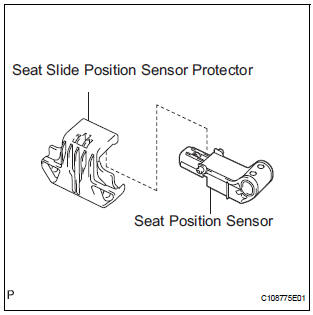
- Remove the seat slide position sensor protector from the seat position sensor.
13. REMOVE SEAT POSITION SENSOR
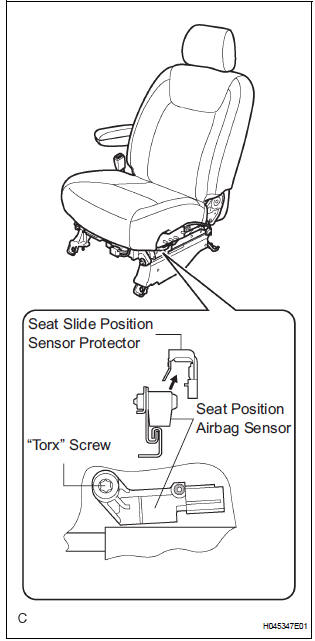
- Disconnect the connector from the seat position sensor.
- Using a "torx" socket wrench (T30), remove the "torx" screw and the seat position sensor.
 Seat position sensor
COMPONENTS
...
 Installation
1. INSTALL SEAT POSITION AIRBAG SENSOR
Check that the ignition switch is off.
Check that the negative battery (-) terminal is
disconnected.
CAUTION:
After disconnecting the neg ...
Other materials:
Registration
HINT:
Register the recognition code when replacing the door
control transmitter or the door control receiver.
Add mode is used to register new recognition codes while
still retaining codes already registered. This mode is used
when a new transmitter is added. If the number of ...
ON / OFF Indication Parameter Error
DTC 01-E2 ON / OFF Indication Parameter Error
DESCRIPTION
DTC No.
DTC Detection Condition
Trouble Area
01-E2
The signal for ON/OFF control from the master device
has a problem
Radio and navigation assembly
INSPECTION PROCEDURE
HINT:
After the insp ...
If the engine will not
start
If the engine will not start even though correct starting procedures
are being followed (, 228), consider each of the following
points:
The engine will not start even though the starter motor operates
normally.
One of the following may be the cause of the problem:
There may not be sufficien ...
