
Toyota Sienna Service Manual: Removal
1. REMOVE FRONT WHEELS
2. REMOVE FRONT STABILIZER LINK ASSEMBLY LH
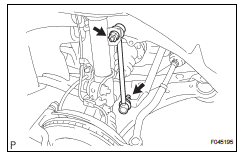
(a) Remove the 2 nuts and front stabilizer link assembly LH.
HINT: If the ball joint turns together with the nut, use a hexagon (6 mm) wrench to hold the stud.
3. REMOVE FRONT STABILIZER LINK ASSEMBLY RH
HINT: Remove the RH side by the same procedures as the LH side.
4. REMOVE FRONT STABILIZER BRACKET NO.1 LH
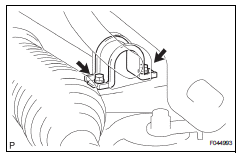
(a) Remove the 2 bolts and the front stabilizer bracket No.1 LH.
5. REMOVE FRONT STABILIZER BRACKET NO.1 RH
HINT: Remove the RH side by the same procedures as the LH side.
6. SEPARATE TIE ROD ASSEMBLY LH
HINT: (See page AH-4) SST 09628-62011
7. SEPARATE TIE ROD ASSEMBLY RH
SST 09628-62011
HINT: Separate the RH side by the same procedures as the LH side.
8. DISCONNECT PRESSURE FEED TUBE ASSEMBLY
HINT: (See page PS-21) SST 09023-12701
9. SEPARATE STEERING INTERMEDIATE SHAFT ASSEMBLY
HINT: (See page PS-21)
10. REMOVE RACK & PINION POWER STEERING GEAR ASSEMBLY
HINT: (See page PS-21)
11. REMOVE FRONT STABILIZER BAR BUSH NO.1
12. REMOVE STABILIZER BAR FRONT
 Front stabilizer bar (for 2wd)
COMPONENTS
...
 Inspection
1. INSPECT FRONT STABILIZER LINK ASSEMBLY LH
(a) As shown in the illustration, flip the ball joint stud
back and forth 5 times, before installing the nut.
(b) Using a torque wrench, turn the ...
Other materials:
Installation
1. INSTALL REAR SEAT 3 POINT TYPE BELT
ASSEMBLY (for 8-Passenger)
HINT:
Refer to the instructions for reassembly of the rear No. 1
seat assembly (for center seat).
Install the rear seat 3 point type belt assembly with
the bolt.
Torque: 42 N*m (430 kgf*cm, 31 ft.*lbf)
2. INSTALL ...
Installation
1. INSTALL PROPELLER W/CENTER BEARING SHAFT ASSEMBLY
(a) Align the matchmarks on the propeller shaft
assembly rear flange and differential companion
flange, and connect the shaft with the 4 bolts,
washers and nuts.
(b) Remove SST(s) from the extension housing.
(c) Insert the yoke int ...
On-vehicle inspection
1. INSPECT FRONT AIRBAG SENSOR (VEHICLE NOT
INVOLVED IN COLLISION)
Perform a diagnostic system check.
2. INSPECT FRONT AIRBAG SENSOR (VEHICLE
INVOLVED IN COLLISION AND AIRBAG HAS NOT
DEPLOYED)
Perform a diagnostic system check.
When the front bumper of the vehicle o ...
