
Toyota Sienna Service Manual: Removal
1. PRECAUTION
CAUTION: Be sure to read "PRECAUTION" thoroughly before servicing.
2. DISCONNECT CABLE FROM NEGATIVE BATTERY TERMINAL
CAUTION: Wait for 90 seconds after disconnecting the cable to prevent the airbag working.
3. REMOVE INSTRUMENT PANEL FINISH PANEL SUBASSEMBLY LOWER LH
4. REMOVE FLOOR CARPET COVER CENTER LH
5. REMOVE FLOOR CARPET COVER CENTER RH
HINT: Use the same procedures for the floor carpet cover center RH and floor carpet cover center LH.
6. REMOVE GLOVE COMPARTMENT DOOR ASSEMBLY
7. REMOVE INSTRUMENT PANEL BOX NO.2
8. REMOVE INSTRUMENT CLUSTER FINISH PANEL ASSEMBLY CENTER
9. REMOVE INSTRUMENT CLUSTER FINISH PANEL SUB-ASSEMBLY LOWER CENTER
10. REMOVE AIR DUCT NO.4 REAR
11. REMOVE AIR DUCT NO.3 REAR
12. REMOVE AIR DUCT NO.1 REAR
13. REMOVE CENTER AIRBAG SENSOR ASSEMBLY
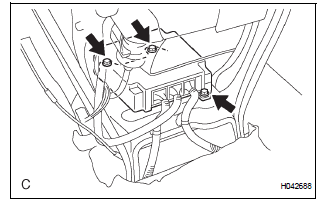
- Disconnect the 3 connectors from the center airbag sensor assembly.
- Remove the 3 bolts and the center airbag sensor assembly.
 On-vehicle inspection
1. INSPECT CENTER AIRBAG SENSOR ASSEMBLY
(VEHICLE NOT INVOLVED IN COLLISION)
Perform a diagnosis system check.
2. INSPECT CENTER AIRBAG SENSOR ASSEMBLY
(VEHICLE INVOLVED IN COLLISION AN ...
 Installation
1. INSTALL CENTER AIRBAG SENSOR ASSEMBLY
Check that the ignition switch is off.
Check that the battery negative (-) terminal is
disconnected.
CAUTION:
After disconnecting the negativ ...
Other materials:
Air conditioning controls
Adjusting the temperature setting
Turn the “TEMP� dial clockwise to increase the temperature and
counterclockwise to decrease the temperature.
The “SYNC� button
The air conditioning system switches between individual (indicator(
s) off) and simultaneous (indicators on) modes.
Whe ...
Disassembly
1. REMOVE BACK DOOR GARNISH CENTER
Using a clip remover, disengage the 5 clips and
remove the garnish center.
2. REMOVE BACK DOOR SIDE GARNISH LH
Using a clip remover, disengage the 3 clips and
remove the side garnish.
3. REMOVE BACK DOOR SIDE GARNISH RH
Using a clip remove ...
Insufficient Coolant Temperature for Closed Loop Fuel Control
DESCRIPTION
Refer to DTC P0115 (See page ES-133).
MONITOR DESCRIPTION
The resistance of the ECT sensor varies in proportion to the actual ECT. The
ECM supplies a constant
voltage to the sensor and monitors the signal output voltage of the sensor. The
signal voltage output
varies acc ...
