
Toyota Sienna Service Manual: Removal
1. REMOVE INSTRUMENT CLUSTER CENTER NO. 1 FINISH PANEL
2. REMOVE INSTRUMENT CLUSTER CENTER NO. 2 FINISH PANEL
3. REMOVE INSTRUMENT CLUSTER FINISH PANEL GARNISH
4. REMOVE RADIO RECEIVER
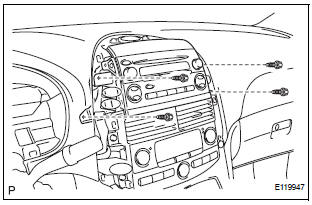
- Remove the 4 screws.
- Disconnect the connectors and remove the radio receiver with bracket.
5. REMOVE RADIO NO. 1 BRACKET
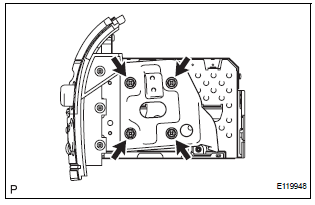
- Remove the 4 screws and radio No. 1 bracket.
6. REMOVE RADIO NO. 2 BRACKET
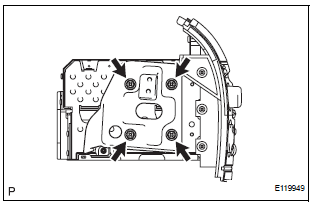
- Remove the 4 screws and radio No. 2 bracket.
 Radio receiver
COMPONENTS
...
 Installation
1. INSTALL RADIO NO. 2 BRACKET
Install radio No. 2 bracket with the 4 screws.
2. INSTALL RADIO NO. 1 BRACKET
Install radio No. 1 bracket with the 4 screws.
3. INSTALL R ...
Other materials:
Before refueling the vehicle
Close all the doors and windows, and turn the engine switch to the
“LOCK� position (vehicles without a smart key system) or off (vehicles
with a smart key system).
Confirm the type of fuel.
Fuel type
Fuel tank opening for unleaded gasoline
To help prevent incorrect fueling, your ve ...
Trip information
Type A
Press the “CAR� button.
Type B
Press the “APPS� button, and then select “Eco� on the screen.
If the “Past Record� screen is displayed, select “Trip Information�.
Reset the trip information data
Previous fuel consumption per
minute
Current fuel ...
Pressing Power Switch does not Turn on System
INSPECTION PROCEDURE
1 CHECK CABIN
Check that conditions in the cabin are not likely to cause
condensation.
HINT:
This problem occurs when the cabin is humid and the
temperature rapidly changes. This condition may
produce condensation, resulting in a short circuit.
OK:
Condensation ...
