
Toyota Sienna 2010-2026 Owners Manual: Turn signal lever
Operating instructions
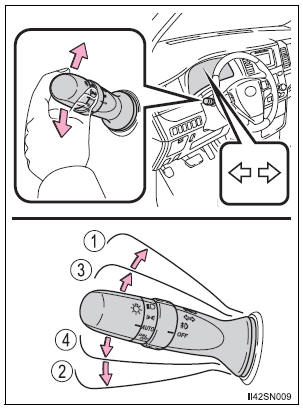
- Right turn
- Left turn
- Lane change to the right (move the lever partway and release it) The right hand signals will flash 3 times.
- Lane change to the left (move the lever partway and release it) The left hand signals will flash 3 times.
Turn signals can be operated when
The engine switch is in the “ON� position (vehicles without a smart key system) or IGNITION ON mode (vehicles with a smart key system).
If the indicator flashes faster than usual
Check that a light bulb in the front or rear turn signal lights has not burned out.
If the turn signals stop flashing before a lane change has been performed
Operate the lever again.
To discontinue flashing of the turn signals during a lane change
Operate the lever in the opposite direction.
 Changing shift ranges in S mode
To enter S mode, shift the shift lever to S. Shift ranges can be selected
by operating the shift lever, allowing you to drive in the shift range of
your choosing. The shift range can be selected by ...
 Parking brake
Operating instructions
To set the parking brake, fully
depress the parking brake pedal
with your left foot while depressing
the brake pedal with your right
foot.
(Depressing the pedal agai ...
Other materials:
Removal
HINT:
Use the same procedures for the RH side and LH side.
The procedures listed below are for the LH side.
1. PRECAUTION
CAUTION:
Be sure to read "PRECAUTION" thoroughly before
servicing.
2. DISCONNECT CABLE FROM NEGATIVE BATTERY
TERMINAL
CAUTION:
Wait for 90 s ...
Removal
1. Drain automatic transaxle fluid
(a) Remove the drain plug, gasket and drain ATF.
(b) Install a new gasket and the drain plug.
Torque: 49 N*m (500 kgf*cm, 36 ft.*lbf)
2. Drain transfer oil (for 4wd)
Hint:
(see page tf-8)
3. Remove front wheel
4. REMOVE FRONT AXLE HUB LH NUT
(a) Us ...
Diagnostic trouble code chart
If a malfunction code is displayed during the DTC check,
check the circuit listed for that code in the chart below
(Proceed to the page given for that circuit).
MULTIPLEX COMMUNICATION SYSTEM
DTC Code
Detection Item
Trouble Area
B1200
MPX Body ECU Stop
...
