
Toyota Sienna 2010-2026 Owners Manual: Using the steering wheel switches
The steering wheel switches can be used to operate a connected cellular phone.
Operating a telephone using the steering wheel switches
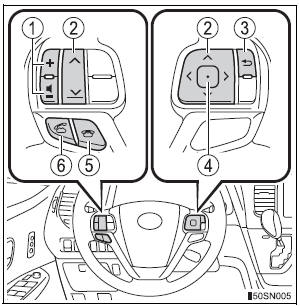
- Volume switch
- Increase/Decrease the volume
- Press and hold: Continuously increase/ decrease the volume
- Cursor switch
- Select a list/tab
- Back switch
- Return to the previous screen
- Enter switch
- Select an item
- On hook switch
- End a call
- Refuse a call
- Off hook switch
- Make a call
- Receive a call
- Display “Phone� screen
 Calling the message sender
Calls can be made to an e-mail/SMS/MMS message sender’s phone
number.
Display the message inbox screen.
Select the desired message.
Select .
Check that the “Call� screen is displayed ...
 Bluetooth® phone
settings
Bluetooth® phone
settings
You can adjust the hands-free system to your desired settings. ...
Other materials:
Power Windows do not Operate at All
DESCRIPTION
If all of the door windows do not operate, no power may be supplied to the
power window master switch or
the power window master switch itself may have a malfunction.
WIRING DIAGRAM
INSPECTION PROCEDURE
1 INSPECT FUSE (PWR, ECU-IG, AM1)
Remove the fuses from the driver sid ...
Check that initialization has been completed
(a) Confirm that the data of tire pressure of all tires are
displayed on the intelligent tester screen.
Tester Display
Measurement Item/Range
Normal Condition
Diagnostic Note
TIREPRESS1
ID1 tire inflation pressure (Absolute
pressure) /
min.: 100 kPa (1 kgf/cm2, 14 ...
Dtc check / clear
1. DTC CHECK (USING SST CHECK WIRE)
(a) Check DTCs.
(1) Turn the ignition switch off.
(2) Using SST, connect terminals TC and CG of
DLC3.
SST 09843-18040
(3) Turn the ignition switch to the ON position.
(4) Read and record any DTCs from the tire
pressure warning light on the combin ...
