
Toyota Sienna Service Manual: Compressor Solenoid Circuit
DESCRIPTION
In this circuit, the compressor receives a refrigerant compression demand signal from the A/C amplifier.
Based on this signal, the compressor changes the amount of compressor output.
WIRING DIAGRAM
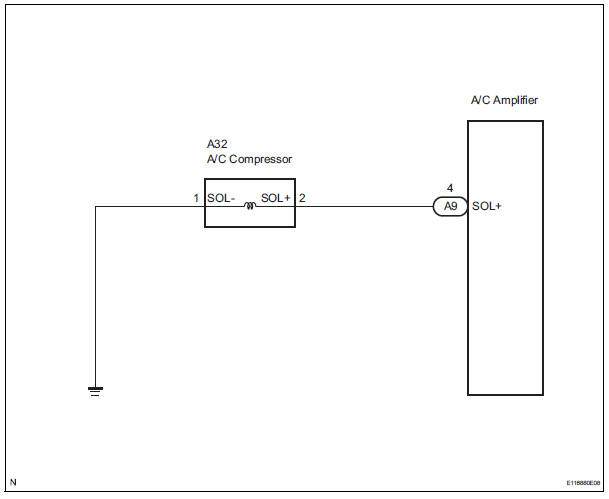
INSPECTION PROCEDURE
1 INSPECT A/C COMPRESSOR
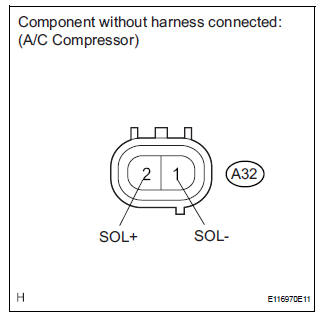
(a) Disconnect the A/C compressor connector.
(b) Measure the resistance according to the value(s) in the table below.
Standard resistance


2 CHECK HARNESS AND CONNECTOR (A/C COMPRESSOR - BODY GROUND)
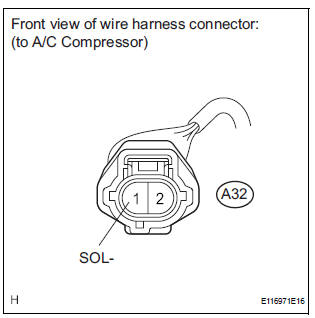
(a) Disconnect the A/C compressor connector.
(b) Measure the resistance according to the value(s) in the table below.
Standard resistance 


3 CHECK HARNESS AND CONNECTOR (A/C COMPRESSOR - A/C AMPLIFIER)
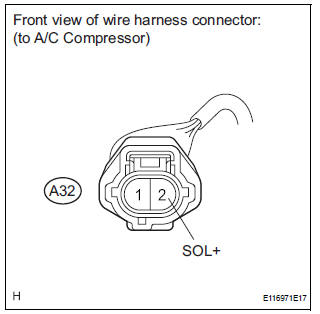
(a) Disconnect the A/C compressor connector.
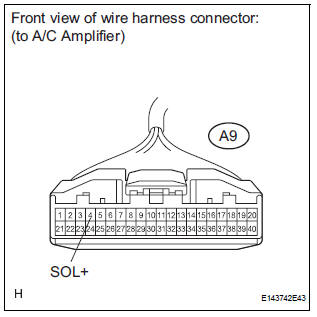
(b) Disconnect the A/C amplifier connector.
(c) Measure the resistance according to the value(s) in the table below
Standard resistance 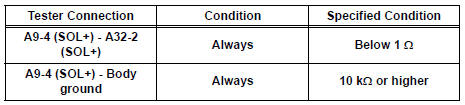
Result 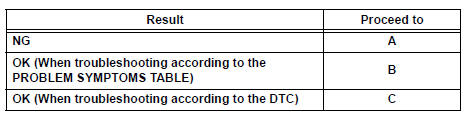

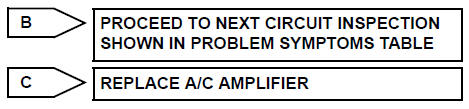
REPAIR OR REPLACE HARNESS OR CONNECTOR
 Rear Air Outlet Damper Control Servo Motor Circuit
DESCRIPTION
This circuit turns the servo motor and changes each damper position by
receiving the signals from the A/
C amplifier.
The rear air outlet damper servo motor switches the air outlet ...
 Multiplex Communication Circuit
DESCRIPTION
INSPECTION PROCEDURE
1 GO TO CAN COMMUNICATION SYSTEM
(a) Refer to the CAN communication system (See page CA-
7).
(b) If the CAN communication system is operating normally,
procee ...
Other materials:
Installation
1. INSTALL FOG LIGHT ASSEMBLY
Install the fog light assembly with the 2 claws and 2
pins.
2. INSTALL FRONT BUMPER ASSEMBLY
3. CONNECT CABLE TO NEGATIVE BATTERY
TERMINAL
4. VEHICLE PREPARATION FOR FOG LIGHT AIMING
5. PREPARATION FOR FOG LIGHT AIMING
6. FOG LIGHT AIMING INSPECT ...
Removal
HINT:
On the LH side, use the same procedures as on the RH side.
1. REMOVE FRONT DOOR SCUFF PLATE RH
Using a screwdriver, disengage the 3 clips and 2
claws, and remove the scuff plate.
HINT:
Tape the screwdriver tip before use.
2. REMOVE FRONT DOOR SCUFF PLATE LH
3. REMOVE REAR DOO ...
Camera Picture Error
DTC 5C-40 Camera Picture Error
DESCRIPTION
DTC No.
DTC Detection Condition
Trouble Area
5C-40
Synchronous signal from the camera cannot be
transmitted.
Wire harness
Television camera assembly
Radio and navigation assembly
...
