
Toyota Sienna Service Manual: Data list / active test
1. DATA LIST
HINT: Using the intelligent tester to read the Data List allows the values or states of switches, sensors, actuators and other items to be read without removing any parts. This non-intrusive inspection can be very useful because intermittent conditions or signals may be discovered before parts or wiring is disturbed. Reading the Data List information early in troubleshooting is one way to save diagnostic time.
(a) Connect the intelligent tester to the DLC3.
(b) Turn the ignition switch to the ON position.
(c) From the display on the tester, read the "DATA LIST".
AIR CONDITIONER / DATA LIST
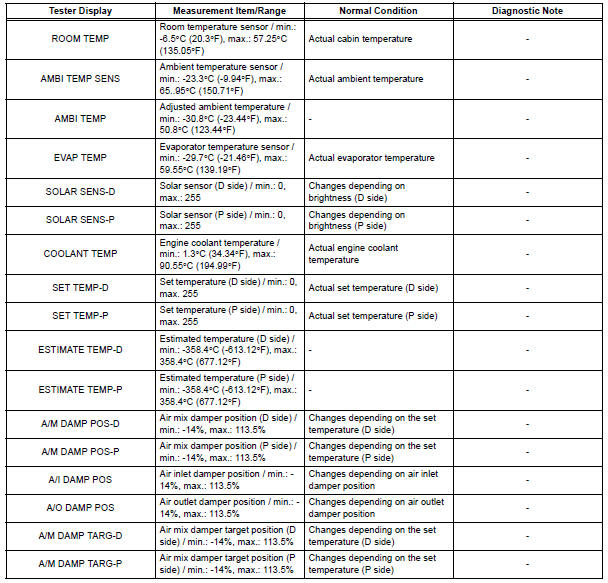
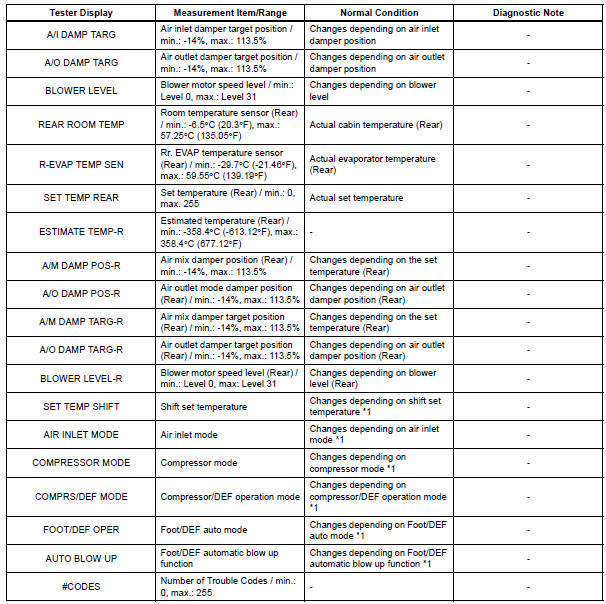
HINT: *1: It differs depending on the user setting.
2. ACTIVE TEST
HINT: Using the intelligent tester to perform Active Tests allows relays, VSVs, actuators and other items to be operated without removing any parts. This non-intrusive functional inspection can be very useful because intermittent operation may be discovered before parts or wiring is disturbed. Performing Active Tests early in troubleshooting is one way to save diagnostic time. Data List information can be displayed while performing Active Tests.
(a) Connect the intelligent tester to the DLC3.
(b) Turn the ignition switch to the ON position.
(c) From the display on the tester, read the "ACTIVE TEST".
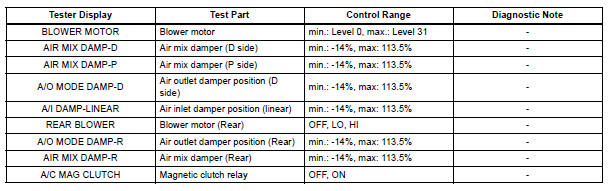
 Check mode procedure
1. LIST OF OPERATION METHODS
By operating each of the A/C control switches as shown
in the diagram below, it is possible to enter the diagnosis
check mode.
...
 Diagnostic trouble code chart
If a trouble code is displayed during the DTCs check (sensor
check), check the circuit listed for the code in the table below
(Proceed to the page given for that circuit).
AIR CONDITIONING SYSTEM
...
Other materials:
Disassembly
1. Remove rear wheel
2. Drain brake fluid
Notice:
wash the brake fluid off immediately if it attaches to
any painted surface.
3. REMOVE REAR BRAKE DRUM SUB-ASSEMBLY
(a) Release the parking brake lever, and remove the
rear brake drum.
HINT:
If the rear brake drum cannot be removed easily,
p ...
Intermediate Shaft Speed Sensor "A"
DESCRIPTION
This sensor detects the rotation speed of the counter gear. By comparing the
counter gear speed signal
(NC) with the direct clutch speed sensor signal (NT), the ECM detects the shift
timing of the gears and
appropriately controls the engine torque and hydraulic pressure according ...
CD Abnormal/ Excess Current/ Tray Insertion / Ejection Error/ CD Abnormal/
Excess Current/ Tray Insertion / Ejection Error
DTC 62-44 CD Abnormal
DTC 62-48 Excess Current
DTC 62-50 Tray Insertion / Ejection Error
DTC 63-44 CD Abnormal
DTC 63-48 Excess Current
DTC 63-50 Tray Insertion / Ejection Error
DESCRIPTION
DTC No.
DTC Detecting Condition
Trouble Area
62-44
Operation error ...
