
Toyota Sienna Service Manual: Data list / active test
1. DATA LIST
HINT: Using the DATA LIST displayed on the intelligent tester, you can read the value of the switch, sensor, actuator, etc. without parts removal. Reading the DATA LIST as the first step of troubleshooting is one way to shorten the labor time.
- Connect the intelligent tester to the DLC3.
- Turn the ignition switch ON.
- Read the DATA LIST according to the display on the tester.
Power slide door ECU LH/RH:
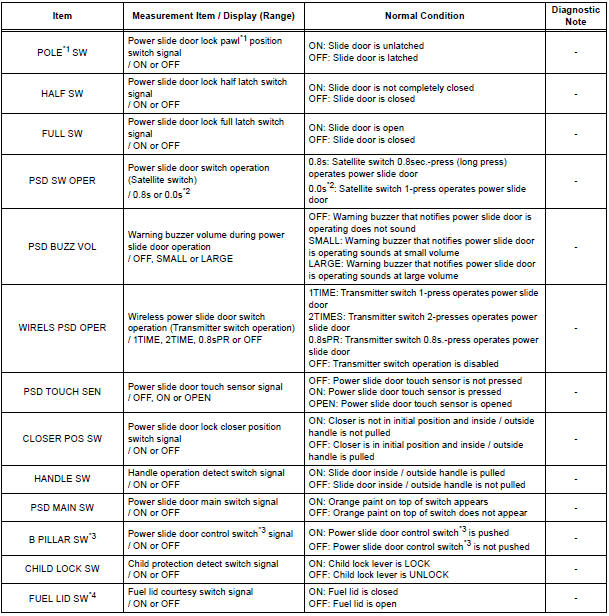
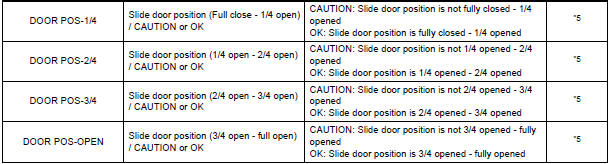
*1 "POLE" appears on the display of the intelligent tester, however the name of the part corresponding to the display of the tester is "pawl".
*2 "0.0s" appearing on the display of the intelligent tester means that a 1-press of the satellite switch operates the power slide door.
*3 "B PILLAR SW" appears on the display of the intelligent tester, however the name of the part corresponding to the display of the tester is "Power slide door control switch".
*4 Power slide door ECU LH only.
*5 In case that the "CAUTION" is displayed even without resistance applied in each range, there must be a foreign object caught somewhere in that range.
2. ACTIVE TEST
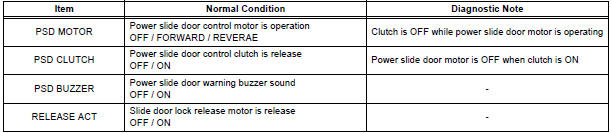
HINT: Performing the ACTIVE TEST using the intelligent tester allows you to operate the relay, VSV, actuator, etc.
without parts removal. Performing the ACTIVE TEST as the first step of troubleshooting is one way to shorten the labor time. It is possible to display the DATA LIST during the ACTIVE TEST.
- Connect the intelligent tester to the DLC3.
- Turn the ignition switch ON.
- Perform the ACTIVE TEST according to the display on the tester.
Power Slide Door ECU LH/RH
 DTC check / clear
1. CHECK DTC (USING INTELLIGENT TESTER)
Checking DTCs.
Connect the intelligent tester to the DLC3.
Turn the ignition switch ON.
Read DTCs by following the prompts o ...
 Diagnostic trouble code chart
If a malfunction code is displayed during the DTC check,
check the circuit listed for that code in the table below.
(Proceed to the page given for that circuit.)
POWER SLIDE DOOR SYSTEM
...
Other materials:
On-vehicle inspection
1. CHECK POWER SEAT FUNCTION
Check the basic functions.
Operate the power seat switches and check the
following seat functions:
Sliding
Reclining
Front vertical (Driver side seat only)
Lifter (Driver side seat only)
Lumbar suppo ...
Diagnosis system
1. DESCRIPTION
When troubleshooting a vehicle with the diagnosis
system, the only difference from the usual
troubleshooting procedure is connecting the
intelligent tester to the vehicle and reading various
data output from the vehicle's clearance warning
ECU.
The clearance warn ...
Reassembly
1. INSTALL UNDERDRIVE PLANETARY RING GEAR
HINT:
Use a torque wrench with a fulcrum length of 160
mm (6.3 in.).
(a) Install a new snap ring to the outer race of the radial
ball bearing rear.
HINT:
When replacing the bearing, also replace the
counter driven gear with a new one.
(b) Us ...
