
Toyota Sienna Service Manual: Diagnosis system
1. BUS CHECK
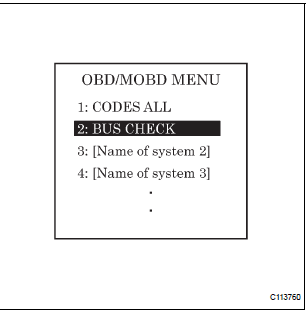
- Select "BUS CHECK" from the "OBD/MOBD MENU" screen.
HINT: The ECUs and sensors that are properly connected to the CAN communication system can be displayed using the intelligent tester via the CAN VIM.
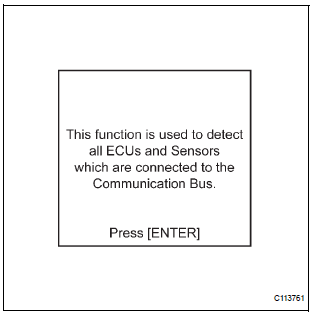
- Press "ENTER" on the intelligent tester.
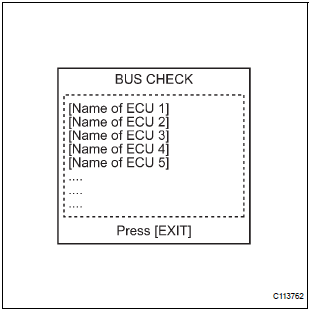
- The screen displays the ECUs and sensors that are properly connected to the CAN communication system.
HINT: Properly connected ECUs or sensors that are not displayed on the screen indicate that a communication stop is occuring in the system, sensor, or ECU which is not displayed.
2. CHECK FOR INSTALLED SYSTEMS (ECUS AND SENSORS) THAT USE CAN COMMUNICATION
- Systems (ECUs, sensors) that use CAN communication vary depending on the vehicle's optional equipment. Check which systems (ECUs, sensors) are installed on the vehicle.
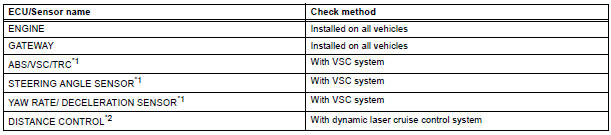
HINT:
- *1: with VSC
- *2: with Dynamic laser cruise control
3. DTC TABLE BY ECU
HINT:
- For the CAN communication system, CAN communication system DTCs stored in certain ECUs can be displayed using the intelligent tester.
- If CAN communication system DTCs are output,
trouble cannot be determined only by the DTCs.
Perform troubleshooting according to "CHECK CAN BUS LINE" (See page CA-35).
- Skid control ECU (with VSC)
HINT: DTC communication uses the CAN communication system.

- ECM (with Dynamic laser cruise control)
HINT:
- DTC communication uses the CAN communication system.
- Distance control ECU data is output.
- Displayed on the "communication malfunction DTCs" screen of the intelligent tester. If U0235 or U1102 is output alone, the CAN communication is normal

- Gateway ECU
HINT: The network gateway ECU is connected to the CAN communication system, but CAN communication DTCs are not output.
4. DTCS COMBINATION TABLE
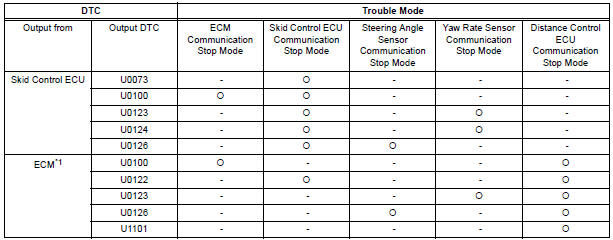
HINT: *1: with Dynamic laser cruise control
 Terminals of ECU
1. JUNCTION CONNECTOR
Junction connector
with VSC
HINT:
*1: with Dynamic laser cruise control
without VSC
CAN junction connector (with VSC)
with VSC
The connection ...
 Fail-safe chart
1. FAIL-SAFE FUNCTION
When communication fails in any of the main wires
(communication lines) due to a short circuit or other
causes, the fail-safe function, which is specified for
each syst ...
Other materials:
Exhaust gas precautions
Harmful substance to the human body is included in exhaust
gases if inhaled.
WARNINGExhaust gases include harmful carbon monoxide (CO),
which is colorless and
odorless. Observe the following precautions.
Failure to do so may cause exhaust gases enter the vehicle and may lead
...
Radio Receiver Power Source Circuit
DESCRIPTION
This circuit provides power to the radio receiver.
WIRING DIAGRAM
INSPECTION PROCEDURE
1 INSPECT RADIO RECEIVER ASSEMBLY
Disconnect the radio receiver connector.
Measure the resistance according to the value in the
table below.
Standard resistance
Measure t ...
Power slide door control switch
INSPECTION
1. INSPECT POWER SLIDE DOOR CONTROL SWITCH
Inspect the resistance of the switch for LH / RH.
Resistance
If the result is not as specified, replace the switch.
Apply battery voltage and check the illuminates.
Standard
If the result is not as specified, replace the ...
