
Toyota Sienna Service Manual: DTC check / clear
1. DTC CHECK
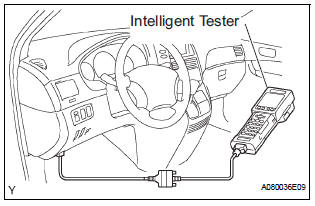
HINT: When DTC B1150/23 is detected as a result of troubleshooting for "Airbag System", perform troubleshooting for the Occupant Classification System.
- Check the DTCs.
- Connect the intelligent tester to the DLC3
- Turn the ignition switch to the ON position.
- Check the DTCs by following the prompts on the tester screen.
HINT: Refer to the intelligent tester operator's manual for further details.
- Clear the DTCs.
- Connect the intelligent tester to the DLC3.
- Turn the ignition switch to the ON position.
- Clear the DTCs by following the prompts on the tester screen.
HINT: Refer to the intelligent tester operator's manual for further details.
 Diagnosis system
1. CHECK DLC3
The ECU uses ISO 15765-4 for communication.
The terminal arrangement of the DLC3 complies
with SAE J1962 and meets the ISO 15765-4 format.
NOTICE:
*: Before mea ...
 Data list / active test
HINT:
By accessing the DATA LIST displayed by the intelligent
tester, you can perform such functions as reading the values
of switches and sensors without removing any parts. Reading
the DATA LIST ...
Other materials:
Data list / active test
1. DATA LIST
HINT:
Using the intelligent tester to read the Data List allows
the values or states of switches, sensors, actuators and
other items to be read without removing any parts. This
non-intrusive inspection can be very useful because
intermittent conditions or signals may be discovered ...
Towing with a wheel-lift type truck
From the front (2WD models)
Release the parking brake.
From the front (AWD models)
Use a towing dolly under the rear
wheels.
From the rear
Use a towing dolly under the front
wheels. ...
Inspection
1. Inspect pack clearance of reverse clutch
(A) install the intermediate shaft and needle roller
bearing onto the transaxle rear cover.
(B) using a dial indicator, measure the reverse clutch
pack clearance while applying and releasing
compressed air (392 kpa, 4.0 Kgf/cm2, 57 psi).
Pack c ...
