
Toyota Sienna Service Manual: DTC check / clear
1. CHECK DTC
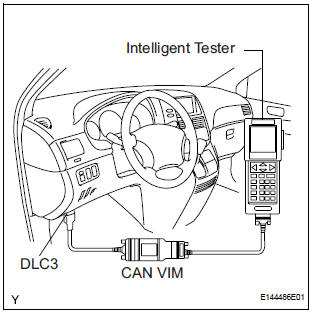
- Connect the intelligent tester to the DLC3.
- Connect the intelligent tester to the Controller Area Network Vehicle Interface Module (CAN VIM). Then connect the CAN VIM to the Data Link Connector 3 (DLC3).
- Turn the ignition switch to the ON position.
- Read the DTCs by following the prompts on the tester screen.
HINT: Refer to the intelligent tester operator's manual for further details.
2. CLEAR DTC
- Connect the intelligent tester to the DLC3.
- Turn the ignition switch to the ON position.
- Operate the intelligent tester to erase the codes.
HINT: Refer to the intelligent tester operator's manual for further details.
 Diagnosis system
1. DIAGNOSIS FUNCTION
The diagnosis function makes the light and the
multi-information display come on, and the CRUISE
main indicator light blink as shown in the illustration.
When ...
 Fail-safe chart
1. AUTO CANCEL FUNCTION (FAIL-SAFE FUNCTION):
HINT:
If a system malfunction occurs, the applicable DTCs will
appear on the multi-information display. In some cases,
a DTC will be set due to we ...
Other materials:
Disassembly
1. REMOVE BACK DOOR GARNISH CENTER
Using a clip remover, disengage the 5 clips and
remove the garnish center.
2. REMOVE BACK DOOR SIDE GARNISH LH
Using a clip remover, disengage the 3 clips and
remove the side garnish.
3. REMOVE BACK DOOR SIDE GARNISH RH
Using a clip remove ...
Unlock warning switch
INSPECTION
1. INSPECT UNLOCK WARNING SWITCH ASSEMBLY
Remove the unlock warning switch assembly .
Measure the resistance according to the value(s) in
the table below.
Standard resistance
...
Black Screen
INSPECTION PROCEDURE
1 CHECK DISPLAY SETTING
Check that the display is not in "Screen OFF" mode.
OK:
The display setting is not in "Screen OFF" mode.
2 CHECK IMAGE QUALITY SETTING
Check that the screen color quality can be set.
OK:
Setting is possible.
PRESS PA ...
