
Toyota Sienna Service Manual: Half Connection in Center Airbag Sensor Assembly Connectors
DTC B1135/24 Half Connection in Center Airbag Sensor Assembly Connectors
DESCRIPTION
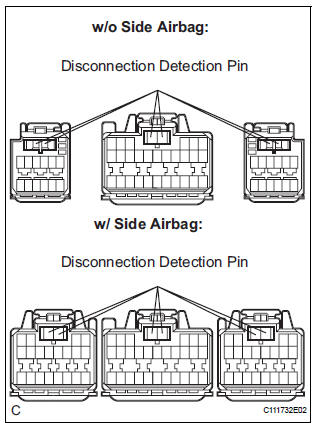
The center airbag sensor assembly connector has a mechanism that electrically detects half connection.
The center airbag sensor assembly monitors the voltage applied to the disconnection detection pins and detects half connection.
DTC B1135/24 is recorded when the center airbag sensor assembly detects an open circuit in the electrical connection check mechanism of the airbag sensor connector or in the airbag sensor circuit.
|
DTC No. |
DTC Detecting Condition |
Trouble Area |
| B1135/24 |
|
|
INSPECTION PROCEDURE
1 CHECK CENTER AIRBAG SENSOR ASSEMBLY CONNECTOR
- Turn the ignition switch to the LOCK position.
- Disconnect the negative (-) terminal cable from the battery, and wait for at least 90 seconds.
- Check the connection of the center airbag sensor assembly connectors.
OK: The connectors are connected. HINT: When the connectors are not firmly connected, disconnect them once and reconnect them securely

2 CHECK CENTER AIRBAG SENSOR ASSEMBLY
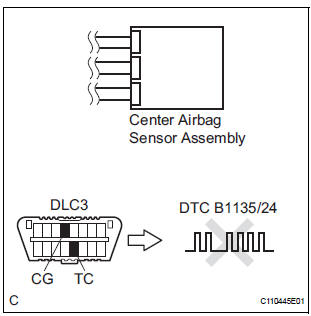
- Connect the negative (-) terminal cable to the battery, and wait for at least 2 seconds.
- Turn the ignition switch to the ON position, and wait for at least 60 seconds.
- Clear the DTCs stored in memory (5).
- Turn the ignition switch to the LOCK position.
- Turn the ignition switch to the ON position, and wait for at least 60 seconds.
- Check the DTCs (5).
OK: DTC B1135/24 is not output. HINT: Codes other than code B1135/24 may be output at this time, but they are not related to this check.
 Go to step 3

END
3 PERFORM VISUAL CHECK OF DISCONNECTION DETECTION PIN
- Turn the ignition switch to the LOCK position.
- Disconnect the negative (-) terminal cable from the battery, and wait for at least 90 seconds.
- Disconnect the connectors from the center airbag sensor assembly.
- Check the disconnection detection pin of the connector.
HINT: Compare one connector with the other 2 connectors. OK: No deformation is identified.
 REPAIR OR REPLACE CENTER
AIRBAG
SENSOR ASSEMBLY CONNECTOR
REPAIR OR REPLACE CENTER
AIRBAG
SENSOR ASSEMBLY CONNECTOR

REPLACE CENTER AIRBAG SENSOR ASSEMBLY
 Center Airbag Sensor Assembly Malfunction
DTC B1100/31 Center Airbag Sensor Assembly Malfunction
DESCRIPTION
The center airbag sensor assembly consists of the center airbag sensor
assembly, safing sensor, drive
circuit, diagnosis circuit ...
 Side Airbag Sensor Assembly RH Circuit Malfunction
DTC B1140/32 Side Airbag Sensor Assembly RH Circuit Malfunction
DESCRIPTION
The side airbag sensor RH circuit consists of the center airbag sensor
assembly and side airbag sensor
RH.
If the ce ...
Other materials:
Short to B+ in Front Passenger Side Squib 2nd
Step Circuit
DTC B1188/56 Short to B+ in Front Passenger Side Squib 2nd
Step Circuit
DESCRIPTION
The front passenger side squib 2nd step circuit consists of the center airbag
sensor assembly and the
front passenger airbag assembly.
The circuit instructs the SRS to deploy when deployment conditions are m ...
Check for intermittent problems
1. CHECK FOR INTERMITTENT PROBLEMS
HINT:
For use of the intelligent tester only:
Inspect the vehicle's ECM using check mode.
Intermittent problems are easier to detect with an
intelligent tester when the ECM is in check mode. In
check mode, the ECM uses 1 trip detection logic, which
is more ...
Removal
1. REMOVE INSTRUMENT CLUSTER CENTER NO. 1 FINISH PANEL
2. REMOVE INSTRUMENT CLUSTER CENTER NO. 2 FINISH PANEL
3. REMOVE INSTRUMENT CLUSTER FINISH PANEL GARNISH
4. REMOVE RADIO RECEIVER
Remove the 4 screws.
Disconnect the connectors and remove the radio
receiver with bracke ...
