
Toyota Sienna Service Manual: How to proceed with troubleshooting
The intelligent tester can be used at steps 3, 7, 10, and 13.
1 VEHICLE BROUGHT TO WORKSHOP

2 CUSTOMER PROBLEM ANALYSIS
(a) Interview the customer to confirm the trouble.

3 DTC CHECK/CLEAR AND FREEZE FRAME DATA

4 PROBLEM SYMPTOM CONFIRMATION

5 PROBLEM SYMPTOM SIMULATION
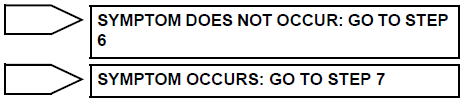
6 SYMPTOM SIMULATION

7 DTC CHECK
(a) Check for output DTCs (See page BC-10).

8 PROBLEM SYMPTOMS TABLE

GO TO STEP 10
9 DTC CHART

10 CIRCUIT INSPECTION

11 IDENTIFICATION OF PROBLEM
12 REPAIR OR REPLACE
13 CONFIRMATION TEST
END
 Anti-lock brake system
Parts location
...
 Test mode procedure
1. SPEED SENSOR SIGNAL CHECK (WHEN USING SST CHECK WIRE):
HINT:
If the ignition switch is turned from the ON to the ACC
or LOCK position during Test Mode, the DTCs of the
signal check functio ...
Other materials:
Precaution
1. INSPECTION PROCEDURE FOR VEHICLE INVOLVED
IN ACCIDENT
Perform the zero point calibration and sensitivity
check if any of the following conditions occur.
The occupant classification ECU is replaced.
Accessories (seatback tray and seat cover, etc.)
are installed.
...
Installation
1. INSTALL INTEGRATION CONTROL AND PANEL
ASSEMBLY
2. INSTALL RADIO RECEIVER WITH BRACKET (w/
Navigation System)
3. INSTALL RADIO RECEIVER WITH BRACKET (w/o
Navigation System)
4. INSTALL INSTRUMENT CLUSTER FINISH PANEL
GARNISH
5. INSTALL INSTRUMENT CLUSTER FINISH PANEL
ASSEMBLY CENTER
6. IN ...
Installation
HINT:
Use the same procedures for the RH side and LH side.
The procedures listed below are for the LH side.
1. INSTALL REAR AIRBAG SENSOR LH
Check that the ignition switch is off.
Check that the battery negative (-) terminal is
disconnected.
CAUTION:
...
