
Toyota Sienna Service Manual: Inspection
1. INSPECT WINDSHIELD WIPER MOTOR ASSEMBLY
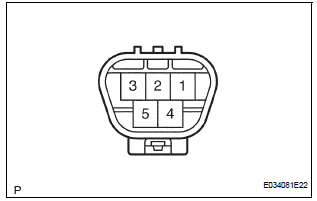
- LO Operation Check
- Connect the battery (+) to the terminal 1 (+1) of the connector, the battery (-) to the terminal 5 (E) of the connector, and check that the motor operates at low speed (LO).
- HI Operation Check
- Connect the battery (+) to the terminal 4 (+2) of the connector, the battery (-) to the terminal 5 (E) of the connector, and check that the motor operates at high speed (HI).
- Automatic Stop Operation Check
- Connect the battery (+) to the terminal 1 (+1) of the connector, the battery (-) to the terminal 5 (E) of the connector. With the motor being rotated at low speed (LO), disconnect terminal 1 (+1) to stop the wiper motor operation at any position except the automatic stop position.
- Using SST, connect the terminal 1 (+1) and 3
(S), and the battery (+) to the terminal 2 (B) to
restart the motor operation at low speed (LO).
SST 09843-18040
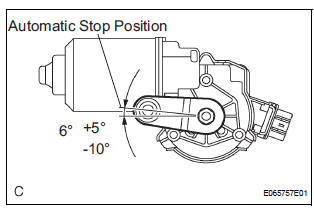
- Check the automatic stop position.
Standard: See the illustration.
 Removal
1. REMOVE FRONT WIPER ARM HEAD CAP
Using a small screwdriver, remove the 2 front wiper
arm covers.
HINT:
Tape up the screwdriver tip before use.
2. REMOVE FR WIPER ARM RH
&nbs ...
 Installation
1. INSTALL WINDSHIELD WIPER MOTOR ASSEMBLY
Apply MP grease to the crank arm pivot of the
windshield wiper motor assembly.
Install the windshield wiper motor assembly with the
...
Other materials:
On-vehicle inspection
1. INSPECT DRIVE BELT
(a) Visually check the drive belt for excessive wear,
frayed cords, etc.
If any defect is found, replace the drive belt.
HINT:
Cracks on the rib side of a belt are considered
acceptable. Replace the belt if there are any
missing ribs.
2. CHECK POWER STEERING FLUID ...
Front Airbag Sensor LH Circuit Malfunction
DTC B1149/37 Front Airbag Sensor LH Circuit Malfunction
DESCRIPTION
The front airbag sensor LH circuit consists of the center airbag sensor
assembly and front airbag sensor
LH.
If the center airbag sensor assembly receives signals from the front airbag
sensor LH, it judges whether or
not ...
Light Sensor Circuit Malfunction
DTC B1244 Light Sensor Circuit Malfunction
DESCRIPTION
This DTC is output when failure in the light sensor circuit is detected.
DTC No.
DTC Detection Condition
Trouble Area
B1244
Malfunction of automatic light control sensor
Open or short of a ...
