
Toyota Sienna Service Manual: Installation
1. INSTALL BRAKE ACTUATOR
NOTICE: Do not remove the hole plugs before connecting the brake tubes. New actuators are filled with brake fluid.
(a) Install the brake actuator assembly with the 2 nuts.
Torque: 5.4 N*m (55 kgf*cm, 48 in.*lbf)
2. INSTALL BRAKE ACTUATOR WITH BRACKET
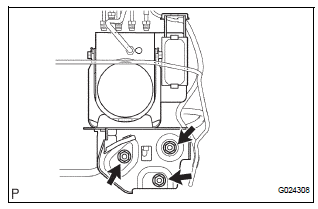
(a) Install the actuator with bracket with the 3 bolts.
Torque: 20 N*m (199 kgf*cm, 14 ft.*lbf)
NOTICE: Be careful not to damage the brake tubes and wire harness.
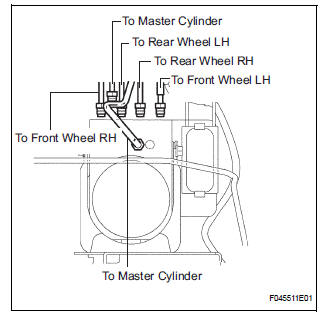
(b) Using SST, connect each brake tube to correct positions of the actuator with bracket, as shown in the illustration.
Torque: 15 N*m (155 kgf*cm, 11 ft.*lbf)
(c) Connect the brake actuator connector.
3. INSTALL AIR CLEANER ASSEMBLY WITH HOSE
4. FILL RESERVOIR WITH BRAKE FLUID (See page BR- 3)
5. BLEED BRAKE MASTER CYLINDER SUBASSEMBLY (See page BR-3)
6. BLEED BRAKE LINE (See page BR-4)
7. BLEED BRAKE ACTUATOR (See page BR-4)
8. CHECK BRAKE FLUID LEAKAGE
9. CHECK FLUID LEVEL IN RESERVOIR (See page BR- 7)
10. CONNECT BATTERY NEGATIVE TERMINAL
11. PERFORM INITIALIZATION
12. PERFORM YAW RATE SENSOR ZERO POINT CALIBRATION
HINT: See page BC-70.
13. CHECK BRAKE ACTUATOR WITH INTELLIGENT TESTER
HINT: See page BC-178.
 Removal
1. DRAIN BRAKE FLUID
NOTICE:
Wash brake fluid off immediately if it adheres to any
painted surface.
2. DISCONNECT BATTERY NEGATIVE TERMINAL
3. REMOVE AIR CLEANER ASSEMBLY WITH HOSE
4. REMOVE BRA ...
 Brake actuator (w/o vsc)
Components
...
Other materials:
Maintenance
requirements
To ensure safe and economical driving, day-to-day care and regular
maintenance are essential. It is the owner’s responsibility to
perform regular checks. Toyota recommends the following maintenance:
General maintenance
General maintenance should be performed on a daily basis. This can
be done ...
Battery
Check the battery as follows:
Battery exterior
Make sure that the battery terminals are not corroded and that
there are no loose connections, cracks, or loose clamps.
Terminals
Hold-down clamp
Before recharging
When recharging, the battery produces hydrogen gas which is flammable an ...
Touch Panel Switch does not Function
INSPECTION PROCEDURE
1 CHECK TOUCH PANEL
Check for foreign matter on the display.
OK:
The display is clean
2 CHECK TOUCH SWITCH (DISPLAY CHECK MODE)
Enter the "Display Check" mode (Touch Switch Check).
Touch the display in the area where the switch
malfunction o ...
