
Toyota Sienna Service Manual: Installation
1. INSTALL BRAKE ACTUATOR
(a) Install the brake actuator assembly with the 2 nuts.
Torque: 5.4 N*m (55 kgf*cm, 48 in.*lbf)
2. INSTALL BRAKE ACTUATOR WITH BRACKET
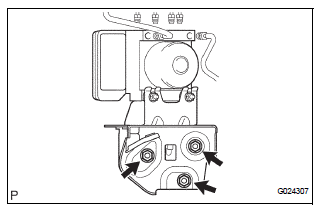
(a) Install the actuator with bracket with the 3 bolts.
Torque: 20 N*m (199 kgf*cm, 14 ft.*lbf)
NOTICE: Be careful not to damage the brake tubes and wire harness.
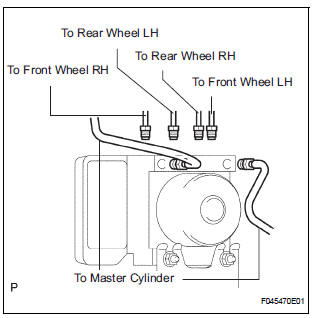
(b) Using SST, connect each brake tube to correct positions of the actuator with bracket, as shown in the illustration.
Torque: 15 N*m (155 kgf*cm, 11 ft.*lbf)
(c) Connect the brake actuator connector assembly.
3. INSTALL AIR CLEANER ASSEMBLY WITH HOSE
4. FILL RESERVOIR WITH BRAKE FLUID (See page BR- 3)
5. BLEED BRAKE MASTER CYLINDER SUBASSEMBLY (See page BR-3)
6. BLEED BRAKE LINE (See page BR-4)
7. CHECK BRAKE FLUID LEAKAGE
8. CHECK FLUID LEVEL IN RESERVOIR (See page BR- 7)
9. CONNECT BATTERY NEGATIVE TERMINAL
10. PERFORM INITIALIZATION
11. CHECK BRAKE ACTUATOR WITH INTELLIGENT TESTER
HINT: See page BC-183.
 Removal
1. DRAIN BRAKE FLUID
NOTICE:
Wash brake fluid off immediately if it adheres to any
painted surface.
2. DISCONNECT BATTERY NEGATIVE TERMINAL
3. REMOVE AIR CLEANER ASSEMBLY WITH HOSE
4. REMOVE BRA ...
 Front speed sensor
Components
...
Other materials:
Diagnosis system
1. CHECK DLC3
The ECU uses ISO 15765-4 for communication.
The terminal arrangement of the DLC3 complies
with SAE J1962 and matches the ISO 15765-4
format.
NOTICE:
*: Before measuring the resistance, leave the
vehicle as is for at least 1 minute and do not
operate the ig ...
Adjustment procedure
Second seat
Tip-up seat (7-passenger models)
Seat position adjustment
lever
Seatback angle adjustment
lever
Tip-up seat (8-passenger models)
Seat position adjustment
lever
Seatback angle adjustment
lever
Ottoman seat
Seat position adjustment
...
For driver side
ON-VEHICLE INSPECTION
1. INSPECT AIR MIX CONTROL SERVO MOTOR
(a) Remove the air mix control servo motor.
(b) Connect the positive (+) lead from the battery to
terminal 4 and negative (-) lead to terminal 5, then
check that the lever turns to "COOL" side smoothly.
(c) Connect ...
