
Toyota Sienna Service Manual: Sound Signal Circuit between Video Terminal and Television Display
DESCRIPTION
This is the sound signal circuit from the video (video adapter) terminal to the television display assembly.
WIRING DIAGRAM
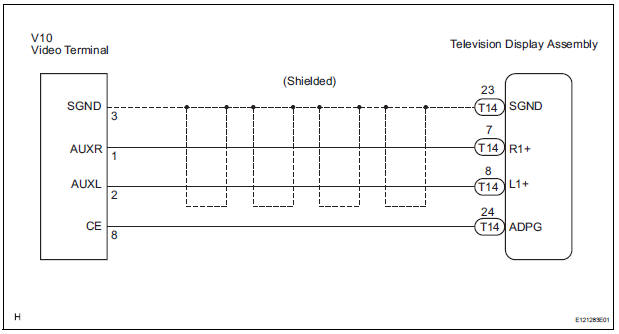
INSPECTION PROCEDURE
1 CHECK HARNESS AND CONNECTOR (TELEVISION DISPLAY ASSEMBLY - VIDEO TERMINAL)
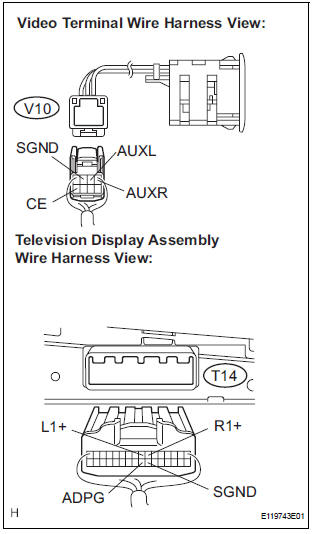
- Disconnect the connectors from the video (video adapter) terminal and television display assembly.
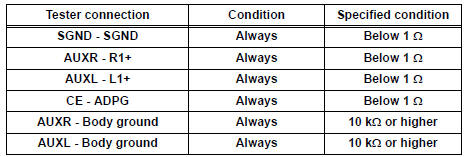
- Measure the resistance according to the value(s) in the table below.
Standard resistance
2 INSPECT VIDEO TERMINAL
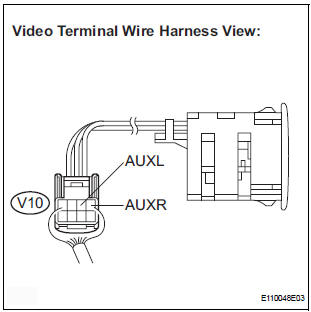
- Reconnect the video (video adapter) terminal connector.
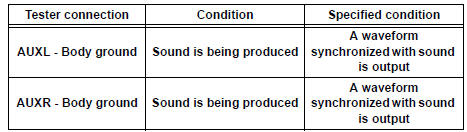
- Using an oscilloscope, check the signal waveform between each terminal and body ground according to the conditions, as shown in the chart.
HINT: An external device system is playing (When the video (video adapter) terminal is used).
Signal waveform
PROCEED TO NEXT CIRCUIT INSPECTION SHOWN IN PROBLEM SYMPTOMS TABLE
 A Remote Control System does not Operate
INSPECTION PROCEDURE
1 CHECK SYSTEM
Check that the remote control operation of the rear
system is not locked by the radio receiver or the radio
and navigation assembly.
Check ...
 Display Signal Circuit between Video Terminal and Television Display
DESCRIPTION
This is the display signal circuit from the video terminal to the television
display assembly.
WIRING DIAGRAM
INSPECTION PROCEDURE
1 CHECK HARNESS AND CONNECTOR (TELEVISION DISPL ...
Other materials:
Power slide door main switch
INSPECTION
1. INSPECT POWER SLIDE DOOR MAIN SWITCH
Inspect the resistance of the switch.
Resistance
If the result is not as specified, replace the switch.
Apply battery voltage and check the illuminates.
Standard
HINT:
Whether the switch illuminates or not will not affect
...
Smart key system
The following operations can be performed simply by carrying
the electronic key on your person, for example in your pocket.
The driver should always carry the electronic key.
Locks and unlocks the doors
Front door handles
Sliding door handles
Back door
Starts and stops the ...
Registration
NOTICE:
The Vehicle Identification Number (VIN) must be input
into the replacement ECM.
HINT:
The VIN is a 17-digit alphanumeric vehicle identification
number. The intelligent tester is required to register the VIN.
1. INPUT INSTRUCTIONS
The general VIN input instructions using the
...
