
Toyota Sienna Service Manual: Installation
1. INSTALL OCCUPANT CLASSIFICATION ECU
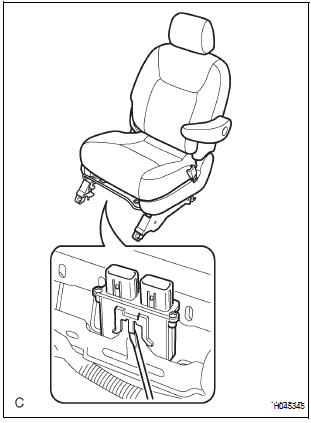
- Check that the ignition switch is off.
- Check that the negative battery (-) terminal is
disconnected.
CAUTION: After disconnecting the negative battery terminal, wait for at least 90 seconds before starting the operation.
- Install the occupant classification ECU.
- Connect the 2 connectors to the occupant classification ECU.
NOTICE:
- If the occupant classification ECU has been dropped, or there are any cracks, dents or other defects in the case or connector, replace it with a new one.
- When installing the occupant classification ECU, be careful that the SRS wiring does not interfere with other parts and that it is not pinched between other parts.
2. INSTALL FRONT SEAT ASSEMBLY (for Manual Seat)
3. INSTALL FRONT RH SEAT ASSEMBLY (for Power Seat)
4. CONNECT CABLE TO NEGATIVE BATTERY TERMINAL
5. PERFORM INITIALIZATION
- Perform initialization.
HINT: Some systems need initialization when disconnecting the cable from the negative battery terminal.
6. INSPECT SLIDE ADJUSTER LOCK (for Manual Seat)
7. INSPECT POWER SEAT OPERATION (for Power Seat)
8. INSPECT SEAT HEATER OPERATION (w/ Seat Heater System)
9. INSPECT SRS WARNING LIGHT
- Inspect the SRS warning light
 Removal
1. PRECAUTION
CAUTION:
Be sure to read "PRECAUTION" thoroughly before servicing.
2. DISCONNECT CABLE FROM NEGATIVE BATTERY
TERMINAL
CAUTION:
Wait for 90 seconds after disconnecting the ...
 Seat belt
...
Other materials:
Installation
1. INSTALL REAR SEAT 3 POINT TYPE BELT
ASSEMBLY (for 8-Passenger)
HINT:
Refer to the instructions for reassembly of the rear No. 1
seat assembly (for center seat).
Install the rear seat 3 point type belt assembly with
the bolt.
Torque: 42 N*m (430 kgf*cm, 31 ft.*lbf)
2. INSTALL ...
CD Sound Skips
INSPECTION PROCEDURE
1 CHECK CD
Check the CD.
OK:
The CD is clean.
HINT:
If dirt is on the CD surface, wipe it clean with a soft cloth
from the inside to the outside in a radial direction.
NOTICE:
Do not use a conventional record cleaner or antistatic
preservative.
2 CHECK CD
...
Removal
1. Remove rear wheel
2. Remove exhaust pipe assembly
Hint:
(see page ex-8)
3. Remove propeller with center bearing
shaft assembly
Hint:
(see page pr-3)
4. REMOVE REAR DIFFERENTIAL FILLER PLUG
(A) using a hexagon wrench (10 mm), remove the filler
plug and gasket.
5. Remove rear differentia ...
