
Toyota Sienna Service Manual: Installation
1. INSTALL BACK DOOR GLASS
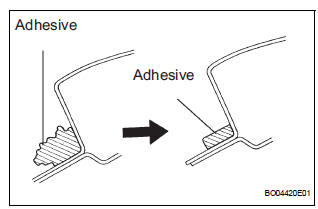
- Clean and shape the contact surface of the vehicle body.
- Using a knife, cut away any rough adhesive on
the contact surface of the body to ensure the
appropriate surface shape.
HINT: Leave as much adhesive on the body as possible.
- Clean the contact surface of the body with a
shop rag saturated with cleaner.
HINT: Even if all the adhesive has been remove, clean the body.
- Using a brush, coat the exposed part of the body on the vehicle side with Primer M.
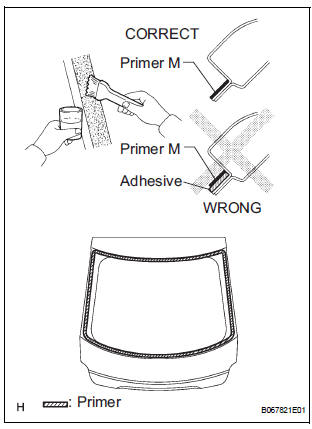
NOTICE:
- Allow the primer coating to dry for 3 minutes or more.
- Do not coat the adhesive with Primer M.
- Do not keep any of the opened Primer M for later use.
- Using a brush or sponge, coat the edge of the glass and the contact surface with Primer G.
HINT: If an area other than that specified is coated by accident, wipe of the primer with a clean shop rag before it dries.
NOTICE:
- Allow the primer coating to dry for 3 minutes or more.
- Do not keep any of the opened Primer G for later use.
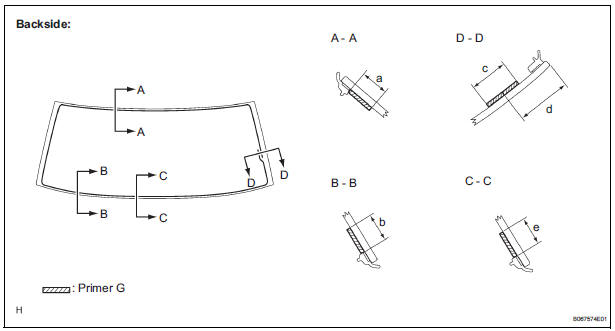
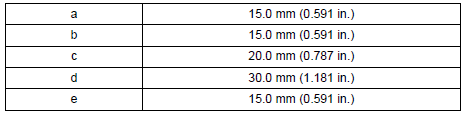
Dimensions:
- Apply adhesive.
Adhesive: Part No. 08850-00801 or equivalent
- Cut off the tip of the cartridge nozzle, as shown in the illustration.
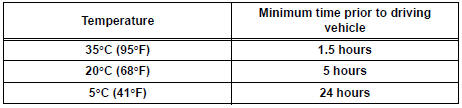
HINT: After cutting off the tip, use all adhesive within the time described in the table below.
Tackfree time

- Load the sealer gun with the cartridge.
- Coat the glass with adhesive, as shown in the illustration.
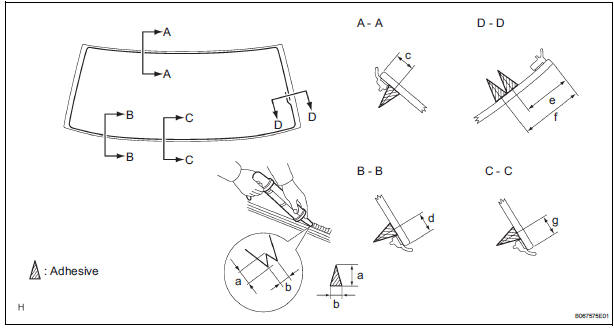
Dimensions:
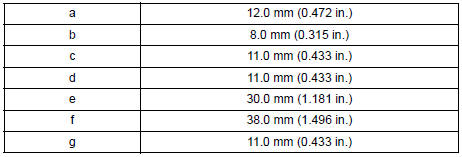
- Install the glass to the body.
- Hold the back window glass in place securely with tape or equivalent to the body until the adhesive has hardened.
NOTICE:
- Allow the primer coating to dry for 3 minutes or more.
- Check that the clips are attached to the body correctly.
- Check the clearance between the body and glass.
- Lightly press the front surface of the glass to ensure a close fit.
- Using a scraper, remove any excess or protruding adhesive.
HINT: Apply adhesive onto the glass rim.
NOTICE: Take care not to drive the vehicle for the time described in the table below.
Minimum time
2. CHECK FOR LEAKAGE AND REPAIR
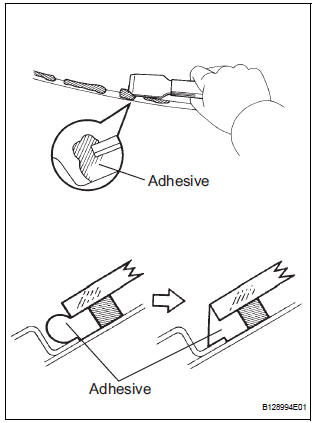
- Conduct a leak test after the adhesive has completely hardened.
- Seal any leaks with auto glass sealer.
3. INSTALL REAR WIPER MOTOR AND BRACKET ASSEMBLY
4. INSTALL REAR WIPER ARM
5. INSTALL FRONT WIPER ARM HEAD CAP
6. INSTALL REAR SPOILER COVER (W/ REAR SPOILER)
7. INSTALL BACK DOOR SERVICE HOLE PLATE
8. INSTALL BACK DOOR TRIM BOARD ASSEMBLY
9. INSTALL BACK DOOR PULL STRAP
10. INSTALL BACK DOOR STRAP COVER
11. INSTALL BACK DOOR SIDE GARNISH RH
12. INSTALL BACK DOOR SIDE GARNISH LH
13. INSTALL BACK DOOR GARNISH CENTER
 Removal
1. REMOVE BACK DOOR GARNISH CENTER
2. REMOVE BACK DOOR SIDE GARNISH LH
3. REMOVE BACK DOOR SIDE GARNISH RH
4. REMOVE BACK DOOR STRAP COVER
5. REMOVE BACK DOOR PULL STRAP
6. REMOVE BACK DOOR TRIM ...
 Window defogger system
PARTS LOCATION
...
Other materials:
Removal
1. DISCONNECT CABLE FROM NEGATIVE BATTERY
TERMINAL
CAUTION:
Wait for 90 seconds after disconnecting the cable to prevent the airbag working
2. REMOVE FRONT SEAT ASSEMBLY
HINT:
Refer to the instructions for removal of the front seat assembly (for
flat type).
Refer to the ins ...
Inspection
1. INSPECT OUTER REAR VIEW MIRROR ASSEMBLY LH (w/o Memory)
Disconnect the mirror connector.
Check operation of the outer mirror.
Apply battery voltage and inspect operation of
the mirror face, as shown in the table and
illustration.
Standard (LH)
If the result i ...
Removal
1. REMOVE INSTRUMENT CLUSTER CENTER NO. 1 FINISH PANEL
2. REMOVE INSTRUMENT CLUSTER CENTER NO. 2 FINISH PANEL
3. REMOVE INSTRUMENT CLUSTER FINISH PANEL GARNISH
4. REMOVE RADIO RECEIVER
Remove the 4 screws.
Disconnect the connectors and remove the radio
receiver with bracke ...
