
Toyota Sienna Service Manual: Installation
1. INSTALL FRONT BUMPER ASSEMBLY
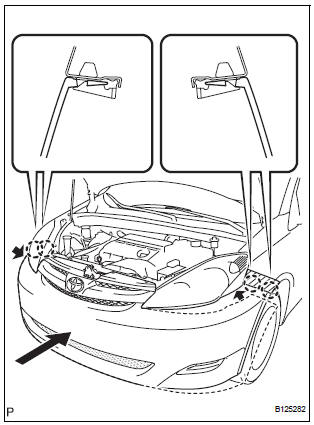
- Push the front bumper onto the front of the vehicle and engage the claws on the left and right sides of the front bumper to install it as shown in the illustration.
HINT:
- Apply protective tape to the bottom part of the front fender to prevent it from being damaged.
- Connect the connectors if necessary.
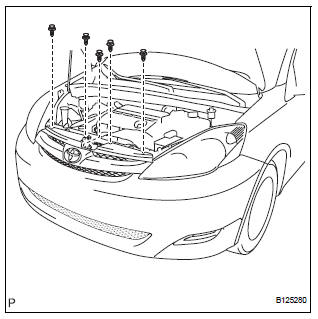
- Install the 5 clips.
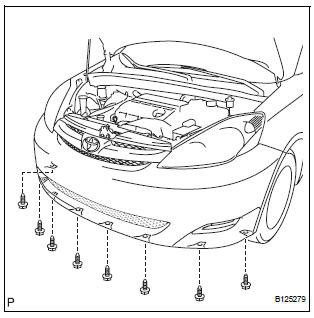
- Connect the engine under cover to the front bumper
assembly with the 8 screws.
Torque: 7.0 N*m (71 kgf*cm, 62.0 in.*lbf)

- Connect the fender liner to the front bumper assembly with the 4 screws.
2. CONNECT CABLE TO NEGATIVE BATTERY TERMINAL
3. VEHICLE PREPARATION FOR FOG LIGHT AIMING (w/ Fog Light) (See page LI-82)
4. PREPARATION FOR FOG LIGHT AIMING (w/ Fog Light) (See page LI-83)
5. FOG LIGHT AIMING INSPECTION (w/ Fog Light) (See page LI-84)
6. FOG LIGHT AIMING ADJUSTMENT (w/ Fog Light)
 Reassembly
1. INSTALL LOWER RADIATOR GRILLE
Engage the 16 claws to install the lower radiator
grille to the front bumper cover.
2. INSTALL FRONT BUMPER HOLE COVER LH (w/o
Fog Light)
Engage ...
 Rear bumper
COMPONENTS
...
Other materials:
Engine
ON-VEHICLE INSPECTION
1. INSPECT ENGINE COOLANT
(a) Inspect the engine coolant (See page CO-1).
2. INSPECT ENGINE OIL
(a) Inspect the engine oil (See page LU-1).
3. INSPECT BATTERY
(a) Inspect the battery (See page CH-5).
4. INSPECT AIR CLEANER FILTER ELEMENT SUBASSEMBLY
(a) Remove the air c ...
Installation
1. INSTALL FRONT PASSENGER AIRBAG ASSEMBLY
Install the front passenger airbag assembly with the
2 screws.
2. INSTALL INSTRUMENT PANEL SUB-ASSEMBLY
3. CONNECT FRONT PASSENGER AIRBAG ASSEMBLY CONNECTOR
Connect the connector to the front passenger airbag
assembly.
...
Map Disc Read Error
DTC 58-42 Map Disc Read Error
DTC 80-42 Map Disc Read Error
DESCRIPTION
DTC No.
DTC Detection Condition
Trouble Area
58-42
Player error
Scratches or dirt on the disc
Access to an invalid address due to software error
...
