
Toyota Sienna 2010-2026 Owners Manual: Operating the meter control switches
The multi-information display is operated using the meter control switches.
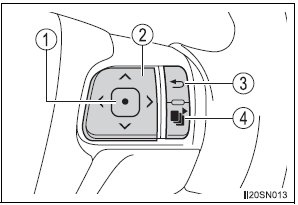
- Enter/Set
- Select an item/Change pages
- Return to the previous screen
- Press: Displays the screen registered as the top screen
When no screen has been registered, the drive information screen will be displayed.
Press and hold: Registers the currently displayed screen as the top screen When the confirmation screen is displayed, select yes to register the screen. If the selected screen cannot be registered, a registration failure message will be shown.
 Display contents
The multi-information display presents
the driver with a variety of
vehicle data.
Menu icons
Displays the following information when an icon is selected.
Some of the information may be ...
 Drive information
Average fuel economy*1, 2
Displays the average fuel consumption since the function was
reset.*3
Tank average fuel economy*1, 2
Displays the average fuel consumption since the vehicle was re ...
Other materials:
Terminals of ecu
1. A/C AMPLIFIER
(a) Waveform 1:
(b) Waveform 2:
(c) Waveform 3: ...
On-vehicle inspection
1. INSPECT SPEEDOMETER
Check the operation.
Using a speedometer tester, check the
speedometer indication according to the table
below.
Reference: mph (U.S.A.)
Reference: km/h (Canada)
NOTICE:
Tire wear as well as over or under inflation
will cause errors.
...
Removal
HINT:
On the RH side, use the same procedures as on the LH side.
1. REMOVE FRONT DOOR SERVICE HOLE COVER LH
Remove the front lower frame bracket garnish LH.
Remove the front door inside handle bezel plug LH.
Remove the front armrest base panel upper LH.
Remove the ...
