
Toyota Sienna Service Manual: Removal
1. RECOVER REFRIGERANT FROM REFRIGERATION SYSTEM (See page AC-172)
2. REMOVE FRONT WHEEL RH
3. REMOVE FRONT FENDER APRON SEAL RH (See page EM-26)
4. REMOVE V-RIBBED BELT (See page EM-6)
5. REMOVE RADIATOR AND FAN ASSEMBLY (See page CO-28)
6. DISCONNECT DISCHARGE HOSE SUB-ASSEMBLY

(a) Remove the bolt and disconnect the discharge hose sub-assembly from the compressor and magnetic clutch.
(b) Remove the O-ring from the discharge hose subassembly.
NOTICE: Seal the openings of the disconnected parts using vinyl tape to prevent entry of moisture and foreign matter.
7. DISCONNECT SUCTION HOSE SUB-ASSEMBLY

(a) Remove the bolt and disconnect the suction hose sub-assembly from the compressor and magnetic clutch.
(b) Remove the O-ring from the suction hose subassembly.
NOTICE: Seal the openings of the disconnected parts using vinyl tape to prevent entry of moisture and foreign matter.
8. REMOVE COMPRESSOR AND MAGNETIC CLUTCH
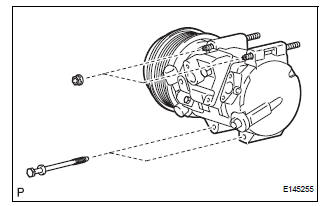
(a) Disconnect the connector.
(b) Release the 2 clamps and wire harness.
(c) Remove the 2 bolts and 2 nuts.
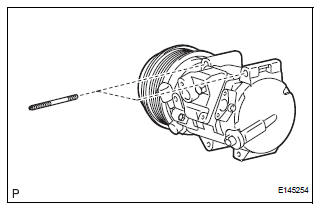
(d) Using a "TORX" socket wrench (E8), remove the 2 stud bolts and the compressor and magnetic clutch.
 Compressor and magnetic clutch
COMPONENTS
...
 Disassembly
1. REMOVE MAGNETIC CLUTCH ASSEMBLY
(a) Place the compressor and magnetic clutch in a vise.
(b) Using locking pliers, hold the magnetic clutch hub.
(c) Remove the bolt, magnetic clutch hub, and
...
Other materials:
Rear Air Mix Damper Position Sensor Circuit
DESCRIPTION
This sensor detects the position of the rear air mix control servo motor
(water valve servo motor) and
sends the appropriate signals to the A/C amplifier. The position sensor is built
in the rear air mix control
servo motor (water valve servo motor).
The position sensor's r ...
Check and replace ecu
NOTICE: • The connector should not be disconnected from
the ECU. Perform the inspection from the
backside of the connector on the wire harness
side.
• When no measuring condition is specified,
perform the inspection with the engine stopped
and the ignition switch on.
• Che ...
Oxygen (A/F) Sensor Pumping Current Circuit
HINT:
Although the DTC titles say oxygen sensor, these DTCs relate to the
Air-Fuel Ratio (A/F) sensor.
Sensor 1 refers to the sensor mounted in front of the Three-Way
Catalytic Converter (TWC) and
located near the engine assembly.
DESCRIPTION
Refer to DTC P2195 (See page ES-355 ...
