
Toyota Sienna Service Manual: Power back door drive unit
INSPECTION
1. INSPECT POWER BACK DOOR DRIVE UNIT
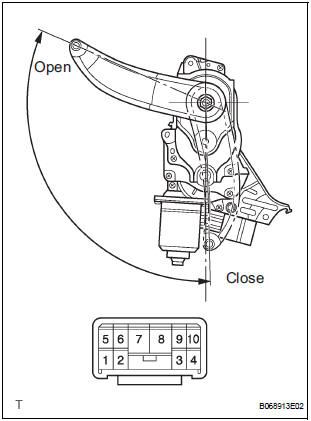
- Remove the unit.
- Apply battery voltage to the terminals and check the motor operation.
Standard
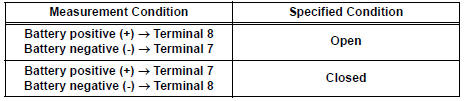
If the result is not as specified, replace the drive unit.
- Check the resistance of the clutch terminals.
Resistance

If the result is not as specified, replace the drive unit.
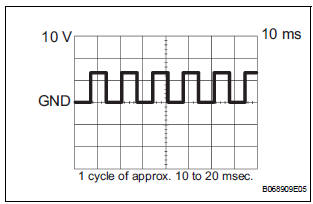
- Reinstall the unit with the connector connected.
- Check the pulse of the pulse sensor.
- Using an oscilloscope, check the pulse generated when the door is manually opened and closed.
Standard (Reference)

If the result is not as specified, replace the drive unit.
HINT: A cycle of the pulse changes between approx.
10 to 20 msec. according to the speeds that the slide door is moving.
- With the connector connected, check the voltage of the terminals of the power back door drive unit connector.
 Power back door touch sensor
INSPECTION
1. INSPECT POWER BACK DOOR TOUCH SENSOR LH
Check the resistance of the sensor.
Resistance
If the result is not as specified, replace the sensor.
2. INSPECT POWER BACK DOOR T ...
 Power back door warning buzzer
INSPECTION
1. POWER BACK DOOR WARNING BUZZER
Check the resistance of the buzzer.
Resistance
If the result is not as specified, replace the buzzer.
NOTICE:
The circuit that causes t ...
Other materials:
Open in Rear Curtain Shield Squib LH Circuit
DTC B1636/88 Open in Rear Curtain Shield Squib LH Circuit
DESCRIPTION
The rear curtain shield squib LH circuit consists of the center airbag sensor
assembly and the curtain
shield airbag assembly LH.
The circuit instructs the SRS to deploy when deployment conditions are met.
DTC B1636/88 ...
Changing engine switch modes
Modes can be changed by pressing the engine switch with the brake
pedal released. (The mode changes each time the switch is pressed.)
Off*
Emergency flashers can be used.
ACCESSORY mode
Some electrical components such
as the audio system can be used.
The engine switch indicator tu ...
Solar Sensor Circuit (Driver Side)
DESCRIPTION
The solar sensor, which is installed on the upper side of the instrument
panel, detects sunlight and
controls the air conditioning in AUTO mode. The output voltage from the solar
sensor varies according to
the amount of sunlight. When the sunlight increases, the output voltage ...
