
Toyota Sienna Service Manual: Problem symptoms table
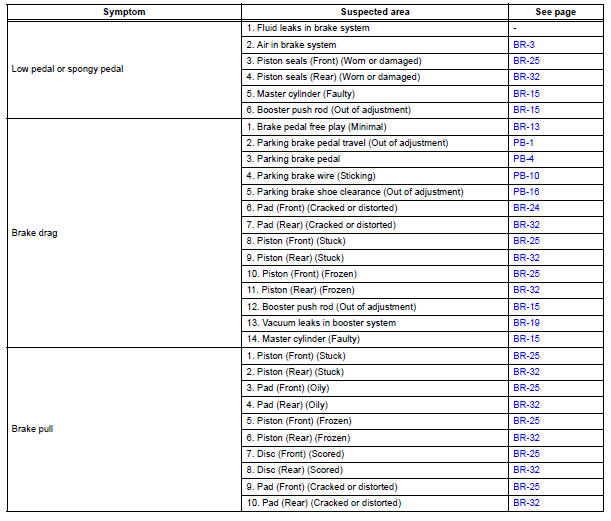
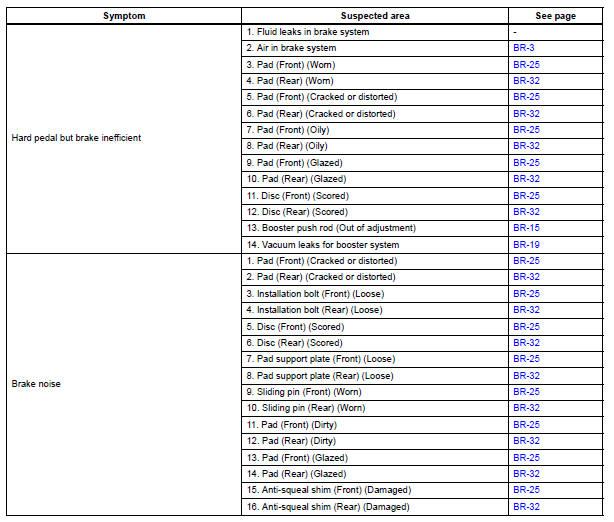
HINT: Refer to the table below to help locate find the cause of the problem. The numbers indicate the priority of the possible cause of problem. Check each part in the order. If necessary, replace these parts.
BRAKE SYSTEM
 Precaution
Care must be taken to replace each part properly as it
could affect the performance of the brake system and
result in a driving hazard. Replace the parts with parts
having the same part numbe ...
 Brake fluid
Bleeding
HINT:
If any work is performed on the brake system or if air in the
brake lines is suspected, bleed the air out of the brake
system.
NOTICE:
Wash the brake fluid off immediately if it a ...
Other materials:
No. 1 Speaker with box
COMPONENTS
ON-VEHICLE INSPECTION
1. INSPECT NO.1 SPEAKER WITH BOX
HINT:
Remove interior parts so that the No.1 speaker with box
can be seen.
Check the speaker installation.
OK:
The speaker is securely installed.
If the result is not as specified, reinstall the No.1
s ...
Fuel Pump Primary Circuit
DTC P0230 Fuel Pump Primary Circuit
DESCRIPTION
This DTC is designed to detect a malfunction in the fuel pump
(FUEL PUMP) relay circuit. When the
system is normal, the battery voltage is applied to FPR terminal of the ECM
while the FUEL PUMP
relay is turned OFF. If the battery v ...
Starting the engine
Check that the parking brake is set.
Check that the shift lever is set in P.
Firmly depress the brake pedal.
The engine switch indicator will turn green. If the indicator does not turn
green, the engine cannot be started.
Press the engine switch.
The engine will crank until it sta ...
