
Toyota Sienna Service Manual: Initialization
1. RESET MEMORY
NOTICE:
|
HINT:
The ECM memorizes the condition that the ECT controls the automatic transaxle assembly and engine assembly according to those characteristics. Therefore, when the automatic transaxle assembly, engine assembly, or ECM has been replaced, it is necessary to reset the memory so that the ECM can memorize the new information.
Reset procedure is as follows.
(a) Turn the engine switch off.
(b) Connect the intelligent tester together with the CAN VIM (controller area network vehicle interface module) to the DLC3.
(c) Turn the ignition switch to the ON position and push the intelligent tester main switch on.
(d) Select the item "DIAGNOSIS / ENHANCED OBD II".
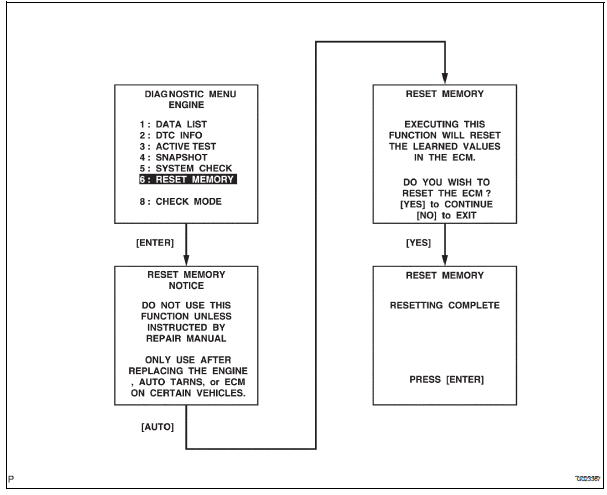
(e) Perform the reset memory procedure from the ENGINE menu.
| CAUTION: After performing the RESET MEMORY, be sure to perform the ROAD TEST (See page AX-9) described earlier. |
HINT: The ECM is learned by performing the ROAD TEST.
(1) Tester menu flow:
 Manual shifting test
1. Perform manual shifting test
Hint:
With this test, it can be determined whether the
trouble occurs in the electrical circuit or is a
mechanical problem in the transaxle.
If any abnormali ...
 Monitor drive pattern
1. MONITOR DRIVE PATTERN FOR ECT TEST
(a) Perform this drive pattern as one method to
simulate the detection conditions of the ECT
malfunctions. (The DTCs may not be detected due
the actual drivin ...
Other materials:
On-vehicle inspection
1. Check battery electrolyte level
(a) Check the electrolyte level.
(1) If the electrolyte level is low, replace the battery
(or add distilled water) and check the charging
system.
2. CHECK BATTERY SPECIFIC GRAVITY
(a) Check the color of the hydrometer.
Result
3. CHECK BATTERY VOLTAGE ...
Distance Control ECU Communication Stop Mode
DESCRIPTION
Detection Item
Symptom
Trouble Area
Distance Control ECU
Communication Stop
Mode
Distance control" is not displayed on the
"Communication Bus Check" screen of the
intelligent tester
Applies to "Distance ...
Short to B+ in Front Passenger Side Squib 2nd
Step Circuit
DTC B1188/56 Short to B+ in Front Passenger Side Squib 2nd
Step Circuit
DESCRIPTION
The front passenger side squib 2nd step circuit consists of the center airbag
sensor assembly and the
front passenger airbag assembly.
The circuit instructs the SRS to deploy when deployment conditions are m ...
