
Toyota Sienna Service Manual: Reassembly
1. INSTALL INPUT SHAFT OIL SEAL RING
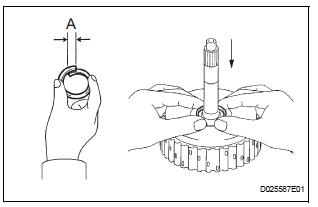
(a) Compress a new input shaft oil seal ring from both sides to reduce dimension A.
Dimension A: 5 mm (0.197 in.)
(b) Coat the oil seal ring with ATF and install it to the input shaft.
NOTICE: Do not expand the end gap of the oil seal ring too much. Fix the hooks firmly.
2. INSTALL FORWARD CLUTCH PISTON SUBASSEMBLY
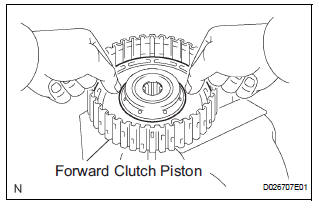
(a) Coat the forward clutch piston with ATF, and install it to the input shaft.
NOTICE: Be careful not to damage the lip of the forward clutch piston.
3. INSTALL FORWARD CLUTCH RETURN SPRING SUB-ASSEMBLY
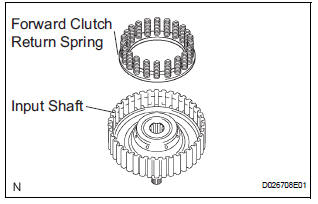
(a) Install the return spring to the input shaft.
NOTICE: Installing the spring sub-assembly, check that all of the springs are fit in the piston correctly.
(b) Coat the clutch balancer with ATF.
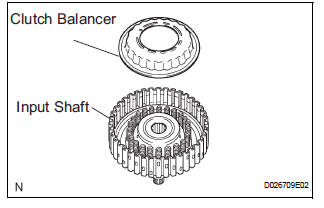
(c) Install the clutch balancer to the input shaft.
NOTICE:
- Be careful not to damage the lip of the forward clutch balancer.
- Make sure that the clutch balancer is not pinched and that there are no other defects at the lip.
- Apply sufficient ATF to the sealing lip before installation.
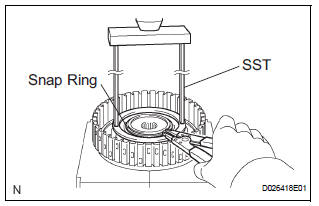
(d) Place SST on the clutch balancer, and compress the clutch balancer with a press.
SST 09387-00020
(e) Install the snap ring with a snap ring expander.
(f) Be sure that the end gap of the snap ring is not aligned with the spring retainer claw.
NOTICE:
- Stop the press when the spring seat is lowered to the place 1 to 2 mm (0.039 to 0.078 in.) from the snap ring groove.
- This prevents the spring seat from being deformed.
- Do not expand the snap ring excessively.
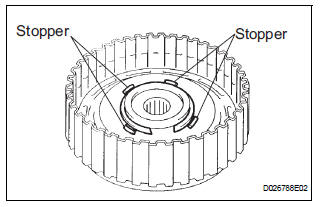
(g) Set the end gap of the snap ring in the piston as shown in the illustration.
NOTICE: The end gap of the snap ring should not align with any of the stoppers.
4. INSTALL FORWARD MULTIPLE DISC CLUTCH DISC
(a) Coat the 5 discs with ATF.
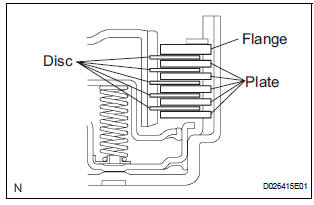
(b) Install the 5 plates, 5 discs and flange input shaft.
NOTICE: Make sure that the plates, discs, and flange are installed as shown in the illustration.
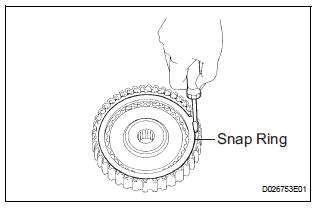
(c) Using a screwdriver, install the snap ring.
(d) Check that the end gap of the snap ring is not aligned with one of the cutouts.
NOTICE: The snap ring should be fully engaged in the groove of the drum.
5. INSPECT PACK CLEARANCE OF FORWARD CLUTCH
HINT: (See page AX-243)
6. INSPECT FORWARD MULTIPLE DISC CLUTCH DISC
HINT: (See page AX-243)
 Inspection
1. INSPECT PACK CLEARANCE OF FORWARD CLUTCH
(a) Install the forward clutch on the oil pump.
NOTICE:
Be careful not to damage the oil seal ring of oil
pump.
b) Using a dial indicator, measure ...
 Direct clutch
Components
...
Other materials:
Slide Door Closer RH does not Operate
DESCRIPTION
The slide door ECU RH controls the slide door closer. In response to the
signals output from the switches
in the slide door lock, the slide door closer drives the closer motor.
HINT:
The slide door closer system operates regardless of the power slide door main
switch ON / OFF.
W ...
Power window regulator
motor
INSPECTION
1. INSPECT POWER WINDOW REGULATOR MOTOR
(FRONT RH)
Remove the power window regulator motor.
Apply battery voltage to the motor connector
according to the table below.
NOTICE:
Do not apply battery to any terminals except
terminals 1 and 2.
Standard
2. INS ...
SRS Warning Light does not Come ON
DESCRIPTION
WIRING DIAGRAM
INSPECTION PROCEDURE
1 CHECK BATTERY
Measure the voltage of the battery.
Standard voltage:
11 to 14 V
CHECK AND REPLACE BATTERY OR
CHARGING SYSTEM
2 CHECK CONNECTORS
Turn the ignition switch to the LOCK position.
Disconnect the negative (-) term ...
