
Toyota Sienna Service Manual: Removal
1. REMOVE FRONT WHEEL
2. REMOVE REAR WHEEL
3. REMOVE TIRE PRESSURE WARNING VALVE AND TRANSMITTER
(a) Remove the valve core and cap, and release the air from the tire.
(b) After ensuring that a sufficient amount of air has been released, remove the nut and washer that are used to secure the tire pressure warning valve and transmitter. Drop the tire pressure warning valve and transmitter inside the tire.
HINT: Keep the removed cap, valve core, nut, and washer.
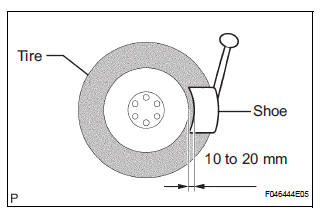
(c) After dropping the tire pressure warning valve and transmitter into the tire, disengage the bead using the shoe of the tire remover.
NOTICE: Be careful not to damage the tire pressure warning valve and transmitter due to interference between the valve and the tire bead.
(d) Remove the bead on the upper side in the usual way.
(e) Take out the tire pressure warning valve and transmitter from the tire and remove the bead on the lower side in the usual way.
NOTICE: If replacing the tire pressure warning valve and transmitter, make sure that a new grommet and a new washer are used.
 Tire pressure warning valve and transmitter
Components
...
 Installation
1. INSTALL TIRE PRESSURE WARNING VALVE AND TRANSMITTER
(a) Insert the tire pressure warning valve and
transmitter into the valve installation hole. Insert it
from the inside of the rim so that ...
Other materials:
Emission inspection and
maintenance (I/M)
programs
Some states have vehicle emission inspection programs which
include OBD (On Board Diagnostics) checks. The OBD system
monitors the operation of the emission control system.
If the malfunction indicator lamp comes on
The OBD system determines that a problem exists somewhere in the
emission contr ...
Customizable features
Settings that can be changed using the audio system screen
Settings that can be changed using the multi-information display
Settings that can be changed by your Toyota dealer
Definition of symbols: O = Available, – = Not available
Gauges, meters and multi-information display (, 93)
...
Diagnostic trouble code chart
1. DTCS FOR OCCUPANT CLASSIFICATION SYSTEM
If a trouble code is displayed during the DTC check,
check the circuit listed for the code in the table below
(proceed to the page listed for that circuit).
HINT:
When DTC B1150/23 is detected as a result of
troubleshooting for the airbag system, pe ...
