
Toyota Sienna Service Manual: Removal
1. REMOVE WINDSHIELD WIPER MOTOR ASSEMBLY
2. REMOVE FRONT OUTER COWL TOP PANEL SUBASSEMBLY
3. DRAIN ENGINE COOLANT
4. REMOVE V-BANK COVER SUB-ASSEMBLY
5. REMOVE NO. 2 AIR CLEANER INLET
6. REMOVE NO. 1 AIR CLEANER INLET
7. REMOVE AIR CLEANER CAP SUB-ASSEMBLY
8. REMOVE AIR CLEANER CASE SUB-ASSEMBLY
9. REMOVE INTAKE AIR SURGE TANK ASSEMBLY
10. REMOVE VVT SENSOR (for Bank 1 Intake Side)
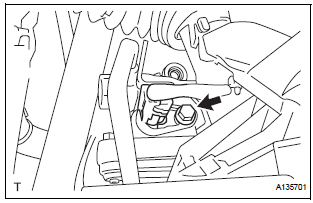
- Disconnect the VVT sensor connector.
- Remove the bolt and VVT sensor.
11. REMOVE VVT SENSOR (for Bank 1 Exhaust Side)
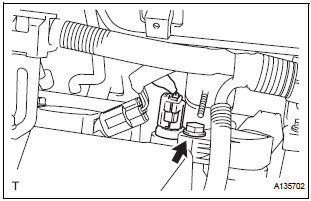
- Disconnect the VVT sensor connector.
- Remove the bolt and VVT sensor.
12. REMOVE VVT SENSOR (for Bank 2 Intake Side)
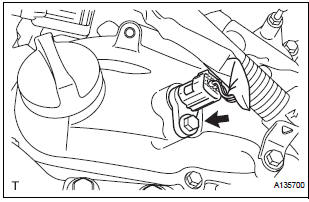
- Disconnect the VVT sensor connector.
- Remove the bolt and VVT sensor.
13. REMOVE VVT SENSOR (for Bank 2 Exhaust Side)
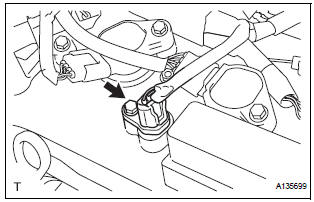
- Disconnect the VVT sensor connector.
- Remove the bolt and VVT sensor.
 On-vehicle inspection
1. CHECK VVT SENSOR OUTPUT VOLTAGE
Turn the ignition switch to the ON position.
Check the voltage between the specified terminal
and body ground.
Standard voltage
While turning ...
 Installation
1. INSTALL VVT SENSOR (for Bank 2 Exhaust Side)
Install the VVT sensor with the bolt.
Torque: 10 N*m (102 kgf*cm, 7 ft.*lbf)
Connect the VVT sensor connector.
2. INSTALL VVT ...
Other materials:
Precaution
1. PRECAUTION OF HEADLIGHT BULB
REPLACEMENT
When any defects such as deformation, crack, dent,
chipping, etc. are identified on the discharge
headlight (especially, on the light control ECU),
replace it with a new one.
Even if the operation seems to be normal, the failsafe
...
Television Display Assembly Communication Error
INSPECTION PROCEDURE
1 IDENTIFY THE COMPONENT SHOWN BY THE SUB-CODE
Enter the diagnostic mode.
Press the "LAN Mon" switch to change to "LAN Monitor"
mode.
Identify the component shown by the sub-code.
HINT:
"110 (multi-display)" i ...
Inspection
1. Inspect generator clutch pulley
(a) Hold the center of the pulley, and confirm that the
outer ring turns counterclockwise and does not turn
clockwise.
If the result is not as specified, replace the clutch
pulley.
2. Remove generator drive end frame bearing
(a) Check that the bear ...
