
Toyota Sienna Service Manual: Installation
1. INSTALL TRANSMISSION CONTROL CABLE ASSEMBLY
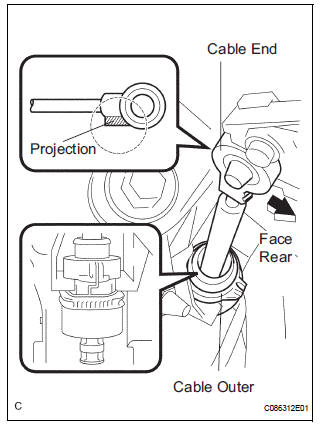
(a) Pull in the control cable to the body.
(b) Install the cable end, as shown in the illustration.
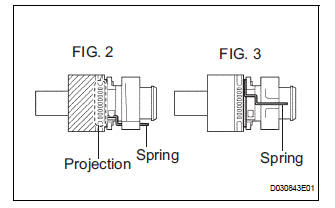
(c) When installing the transmission control cable assembly on the shift lever plate, place the projection of the shift cable downward to fit in the groove of the shift lever plate (FIG.2) Confirm that the spring in the shift cable outer has moved to the position (FIG.3) shown in the illustration.
Confirm that the shift cable is installed on the shift lever plate properly.
NOTICE:
- To prevent torsion of the inner cable, the projection on the eye end should face rear.
- Push the cable end to the bottom of the pin.
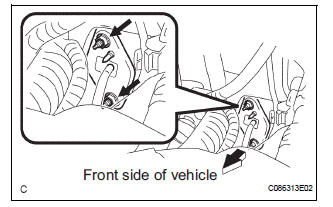
d) Install the transmission control cable assembly and 2 nuts.
Torque: 12 N*m (122 kgf*cm, 9 ft.*lbf)
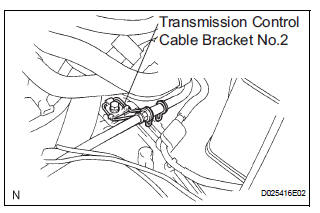
(e) Connect the transmission control cable assembly to the transmission control cable bracket No.2.
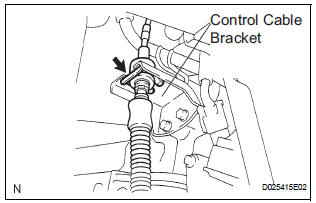
(f) Temporarily install the transmission control cable assembly to the control shaft lever with the nut.
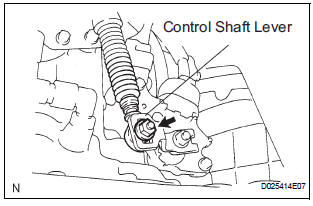
(g) Install the transmission control cable assembly and clip to the bracket.
2. INSTALL INSTRUMENT CLUSTER FINISH PANEL SUB-ASSEMBLY CENTER
HINT: (See page IP-15)
3. ADJUST SHIFT LEVER POSITION
HINT: (See page AX-155)
4. INSPECT SHIFT LEVER POSITION
HINT: (See page AX-155)
 Adjustment
1. INSPECT SHIFT LEVER POSITION
(a) When shifting from P to R position only with ignition
switch ON and brake pedal, make sure that the
shifting lever moves smoothly and can be
moderately operated ...
Other materials:
Cooling system
On-vehicle inspection
1. INSPECT FOR COOLANT LEAK
CAUTION:
Do not remove the radiator cap while the engine and
radiator are still hot. Pressurized, hot engine coolant
and steam may be released and cause serious
burns.
NOTICE:
Before performing each inspection, turn the A/ ...
Fold Lock Switch Circuit
DESCRIPTION
Each of the left and right seats has a fold lock switch that detects the lock
condition of the seat legs and
floor when the seat is in the stowed state. If the fold lock switch detects an
unlock condition, the 3rd SEAT
indicator on the combination meter will come on.
WIRING DIAGR ...
Absence of Registration Unit/ No Response for Connection Check/ Last Mode
Error/ No Response Against ON / OFF Command/ Mode Status Error/ Slave Reset
DTC 01-D5 Absence of Registration Unit
DTC 01-D8 No Response for Connection Check
DTC 01-D9 Last Mode Error
DTC 01-DA No Response Against ON / OFF Command
DTC 01-DB Mode Status Error
DTC 01-DE Slave Reset
DESCRIPTION
HINT:
*1: Even if no fault is present, this trouble code may b ...
