
Toyota Sienna Service Manual: Removal
1. DISCONNECT CABLE FROM NEGATIVE BATTERY TERMINAL
2. REMOVE REAR NO. 2 SEAT LEG SIDE GARNISH SUB-ASSEMBLY
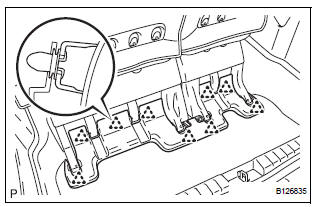
- Disengage the 9 clips and remove the rear No. 2 seat leg side garnish sub-assembly.
- Remove the 9 clips from the rear No. 2 seat leg side garnish sub-assembly.
3. REMOVE REAR SEAT LEG SIDE GARNISH SUBASSEMBLY
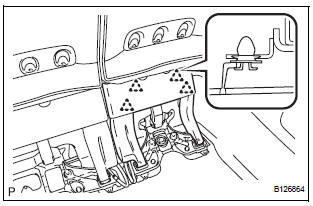
- Disengage the 4 clips and remove the rear seat leg side garnish sub-assembly.
- Remove the 4 clips from the rear seat leg side garnish sub-assembly.
4. REMOVE NO. 2 SEAT HINGE COVER
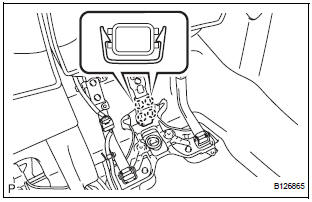
- Disengage the 4 claws and remove the No. 2 seat hinge cover.
5. REMOVE REAR NO. 2 SEAT ASSEMBLY
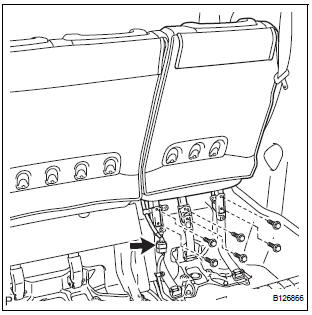
- Disconnect the connector.
- Remove the 6 bolts.
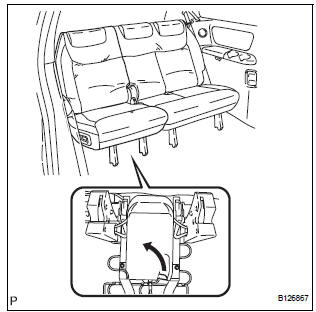
- Pull the lever under the No. 2 seat cushion subassembly and remove the rear No. 2 seat assembly
 Rear no. 2 Seat assembly (for Power Seat Type RH Side)
COMPONENTS
...
 Disassembly
1. REMOVE REAR NO. 2 SEAT COVER BEZEL
Remove the 3 screws.
Disengage the 3 claws and remove the rear No. 2
seat cover bezel.
2. REMOVE REAR SEAT RECLINING COVER RH
& ...
Other materials:
Pressure Control Solenoid "C" Performance (Shift
Solenoid Valve SL3)
SYSTEM DESCRIPTION
The ECM uses signals from the vehicle speed sensor to detect the actual gear
position (1st, 2nd, 3rd, 4th
or 5th gear).
Then the ECM compares the actual gear with the shift schedule in the ECM memory
to detect mechanical
troubles of the shift solenoid valves and valve bo ...
System Voltage
MONITOR DESCRIPTION
The battery supplies electricity to the ECM even when the ignition switch is
off. This power allows the
ECM to store data such as DTC history, freeze frame data and fuel trim values.
If the battery voltage falls
below a minimum level, these memories are cleared and the ...
Data list / active test
1. DATA LIST
HINT:
Using the DATA LIST displayed on the intelligent tester,
you can read the value of the switch, sensor, actuator,
etc. without parts removal. Reading the DATA LIST as
the first step of troubleshooting is one way to shorten the
labor time.
Connect the intelligent tester to ...
