
Toyota Sienna Service Manual: Disassembly
1. REMOVE REAR NO. 2 SEAT COVER BEZEL
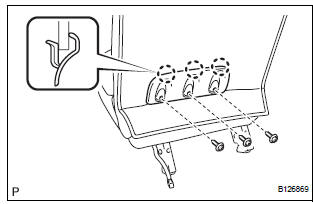
- Remove the 3 screws.
- Disengage the 3 claws and remove the rear No. 2 seat cover bezel.
2. REMOVE REAR SEAT RECLINING COVER RH
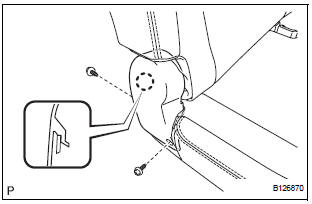
- Remove the 2 screws.
- Disengage the claw and remove the rear seat reclining cover RH.
3. REMOVE REAR SEAT RECLINING COVER LH
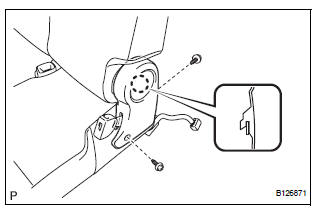
- Remove the 2 screws.
- Disengage the claw and remove the rear seat reclining cover LH.
4. REMOVE REAR SEAT HEADREST ASSEMBLY
5. REMOVE REAR NO. 2 SEAT HEADREST SUPPORT ASSEMBLY LH
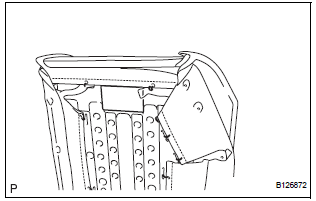
- Remove the pad.
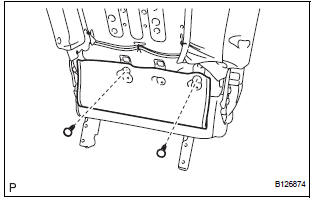
- Remove the 2 clips.
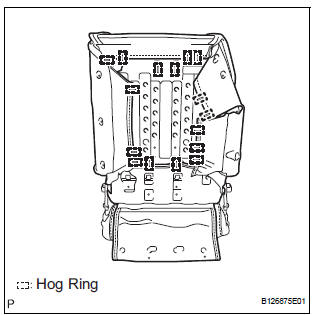
- Remove the 16 hog rings and disconnect the No. 2 seatback cover sub-assembly with pad.
- Turn back the No. 2 seatback cover sub-assembly.
- Disengage the 2 claws and remove the rear No. 2 seat headrest support assembly LH.
6. REMOVE REAR NO. 2 SEAT HEADREST SUPPORT ASSEMBLY RH
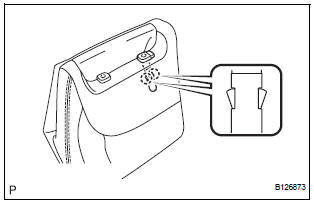
HINT: Use the same procedure described for the LH side.
7. REMOVE NO. 2 SEATBACK COVER SUB-ASSEMBLY WITH PAD
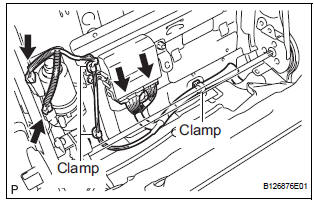
- Disconnect the connectors.
- Disengage the 3 clamps and remove the No. 2 seatback cover sub-assembly with pad
8. REMOVE NO. 2 SEATBACK COVER SUB-ASSEMBLY
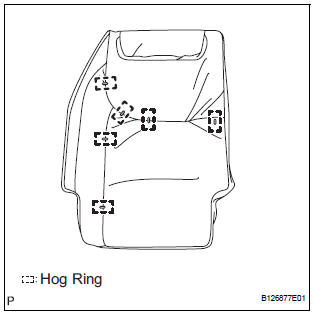
- Remove the 6 hog rings and No. 2 seatback cover sub-assembly.
9. REMOVE NO. 2 SEATBACK PAD
10. REMOVE FOLD SEAT CONTROL ECU
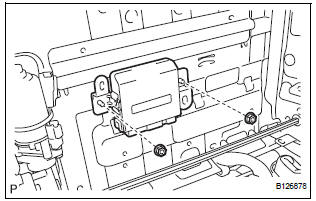
- Remove the 2 nuts and fold seat control ECU.
11. REMOVE NO. 2 SEATBACK FRAME SUB-ASSEMBLY
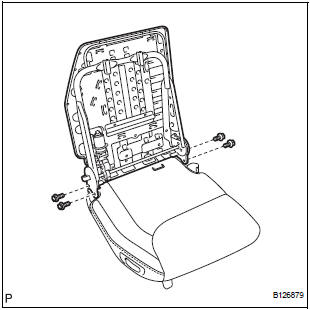
- Remove the 4 bolts and No. 2 seatback frame subassembly
12. REMOVE RECLINING REMOTE CONTROL LEVER BEZEL
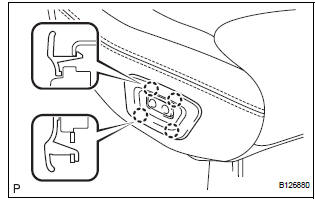
- Disengage the 4 claws and remove the reclining remote control lever bezel.
13. REMOVE REAR POWER SEAT SWITCH
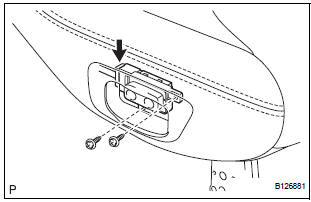
- Remove the 2 screws.
- Disconnect the connector and remove the rear power seat switch.
14. REMOVE REAR NO. 2 SEAT BELT ASSEMBLY INNER
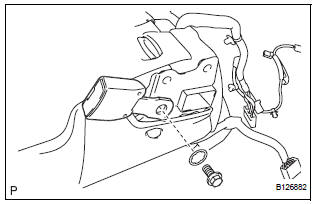
- Remove the bolt, washer and rear No. 2 seat belt assembly inner.
15. REMOVE REAR SEAT COVER
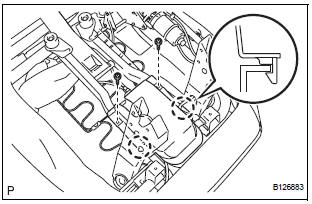
- Remove the 2 screws.
- Disengage the 2 claws and remove the rear seat cover.
16. REMOVE NO. 2 SEAT CUSHION COVER SUBASSEMBLY WITH PAD
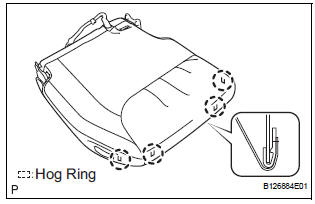
- Raise the 4 rear seat cushion edge protectors.
- Disengage the hooks and remove the No. 2 seat cushion cover sub-assembly with pad.
17. REMOVE NO. 2 SEAT CUSHION COVER SUBASSEMBLY
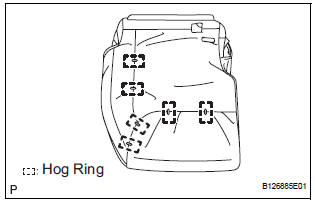
- Remove the 6 hog rings and No. 2 seat cushion cover sub-assembly.
18. REMOVE NO. 2 SEAT CUSHION PAD
19. REMOVE REAR SEAT WIRE
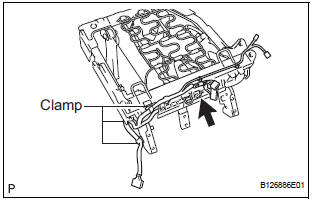
- Disconnect the connector.
- Disengage the 3 clamps and remove the rear seat wire.
20. REMOVE NO. 2 SEAT CUSHION STOPPER
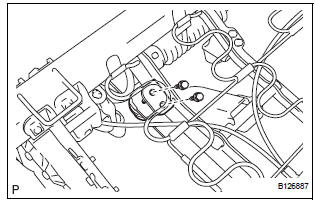
- Remove the 2 bolts and No. 2 seat cushion stopper.
HINT: Use the same procedure to remove the other stopper.
21. REMOVE NO. 2 SEAT CUSHION SPRING ASSEMBLY
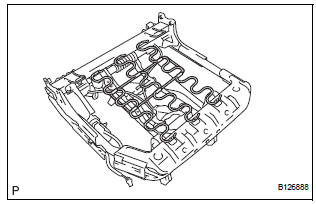
- Remove the No. 2 seat cushion spring assembly.
22. REMOVE NO. 2 SEAT CUSHION FRAME SUBASSEMBLY
23. REMOVE NO. 2 SEAT LEG SUB-ASSEMBLY
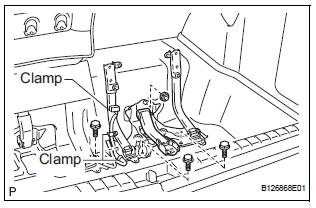
- Disengage the 3 clamps.
- Remove the 3 bolts, nut and No. 2 seat leg subassembly.
 Removal
1. DISCONNECT CABLE FROM NEGATIVE BATTERY
TERMINAL
2. REMOVE REAR NO. 2 SEAT LEG SIDE GARNISH SUB-ASSEMBLY
Disengage the 9 clips and remove the rear No. 2
seat leg side garnish sub-a ...
 Adjustment
HINT:
If the malfunction does not disappear by following the
procedure in ADJUSTMENT and the rear No. 2 seat
assembly needs to be replaced, do not disassemble the rear
No. 2 seat assembly.
1. ADJ ...
Other materials:
Precaution for cooling fan system
NOTICE: • When the ignition switch is turned off and the
engine temperature is high, the cooling fans may
operate for approximately 3 minutes. • After turning the ignition switch
off, keep hands
and objects away from the fans when they are operating.
HINT:
If all of the following a ...
Changing shift ranges in S mode
To enter S mode, shift the shift lever to S. Shift ranges can be selected
by operating the shift lever, allowing you to drive in the shift range of
your choosing. The shift range can be selected by the shift lever.
Upshifting
Downshifting
The selected shift range, from 1 to
6, will b ...
Precaution
1. HANDLING PRECAUTIONS ON STEERING SYSTEM
(a) Be careful to replace the parts properly because
they could affect the performance of the steering
system and result in a driving hazard.
2. HANDLING PRECAUTIONS ON SRS AIRBAG
SYSTEM
(a) The SIENNA is equipped with SRS (Supplemental
Restraint Sys ...
