
Toyota Sienna Service Manual: Removal
1. DISCONNECT CABLE FROM NEGATIVE BATTERY TERMINAL 2. DRAIN ENGINE COOLANT 3. REMOVE FRONT WIPER ARM HEAD CAP (See page WW-4) 4. REMOVE FRONT WIPER ARM RH (See page WW-4) 5. REMOVE FRONT WIPER ARM LH (See page WW-4) 6. REMOVE COWL TOP VENTILATOR LOUVER SUBASSEMBLY (See page WW-4) 7. REMOVE WINDSHIELD WIPER MOTOR AND LINK ASSEMBLY (See page WW-4) 8. REMOVE NO. 1 COWL TOP TO COWL BRACE INNER (See page FU-13) 9. REMOVE COWL TOP PANEL SUB-ASSEMBLY OUTER FRONT (See page FU-13) 10. REMOVE NO. 1 ENGINE UNDER COVER 11. REMOVE V-BANK COVER SUB-ASSEMBLY (See page EM-28) 12. REMOVE AIR CLEANER CAP SUB-ASSEMBLY (See page FU-13) 13. REMOVE INTAKE AIR SURGE TANK ASSEMBLY (See page FU-14) 14. REMOVE NO. 1 SURGE TANK STAY
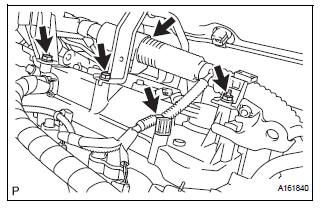
(a) Remove the 2 bolts and nut and disconnect the 2 harness clamps.
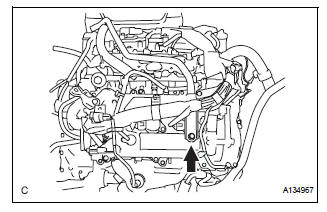
(b) Remove the bolt and No. 1 surge tank stay.
15. REMOVE IGNITION COIL ASSEMBLY
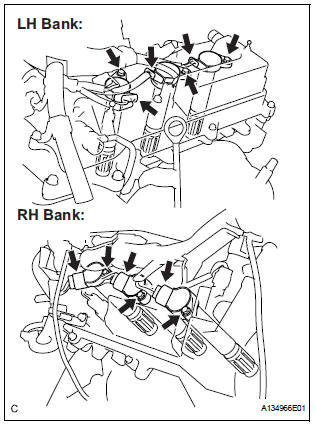
(a) Disconnect the 6 ignition coil connectors.
(b) Remove the 6 bolts and 6 ignition coils.
16. REMOVE SPARK PLUG
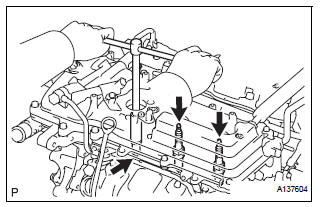
(a) Remove the 6 spark plugs.
 On-vehicle inspection
NOTICE:
In this section, the terms "cold" and "hot" refer to the
temperature of the coils. "Cold" means approximately -
10°C (14°F) to 50°C (122°F). & ...
 Installation
1. INSTALL SPARK PLUG
(a) Install the 6 spark plugs.
Torque: 18 N*m (183 kgf*cm, 13 ft.*lbf)
2. INSTALL IGNITION COIL ASSEMBLY
(a) Install the 6 ignition coils with the 6 bolts.
Torqu ...
Other materials:
Reassembly
1. INSTALL OIL PUMP COVER
(a) Coat the drive and driven rotors with engine oil and
place them into the timing chain cover with the
marks facing outward (oil pump cover side). Check
that the rotors rotate smoothly.
(b) Install the oil pump cover with the 8 bolts.
Torque: 9.1 N*m (93 kgf ...
Installation
1. INSTALL FRONT SEAT ASSEMBLY LH
Place the seat assembly in the cabin.
NOTICE:
Be careful not to damage the body.
Connect the connectors under the seat assembly.
Tighten the 2 bolts on the front side of the seat
assembly.
Torque: 37 N*m (375 kgf*cm, 27 ft.*lb ...
Data list / active test
HINT:
By accessing the DATA LIST displayed by the intelligent
tester, you can perform such functions as reading the values
of switches and sensors without removing any parts. Reading
the DATA LIST as the first step in troubleshooting is one
method to shorten labor time.
1. DATA LIST FOR OCCUPA ...
