
Toyota Sienna Service Manual: Removal
1. REMOVE BATTERY (See page EM-26) 2. REMOVE NO. 2 AIR CLEANER INLET (See page EM- 28) 3. REMOVE AIR CLEANER CAP SUB-ASSEMBLY (See page FU-13) 4. REMOVE AIR CLEANER FILTER ELEMENT (See page EM-28) 5. REMOVE AIR CLEANER CASE SUB-ASSEMBLY (See page EM-28) 6. REMOVE AIR CLEANER BRACKET
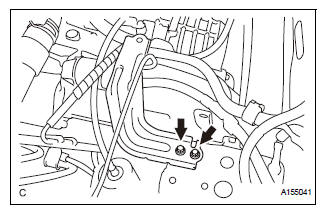
(a) Remove the 2 bolts and the air cleaner bracket.
7. REMOVE NO. 1 AIR CLEANER INLET
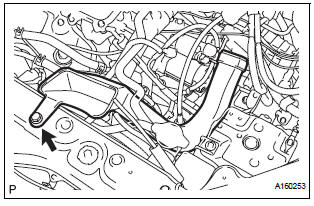
(a) Remove the bolt and the No. 1 air cleaner inlet.
8. REMOVE STARTER ASSEMBLY
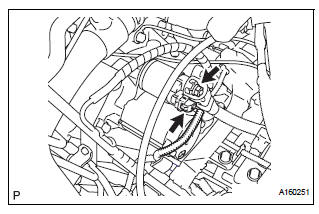
(a) Disconnect the starter connector.
(b) Open the terminal cap and remove the nut and the starter wire.
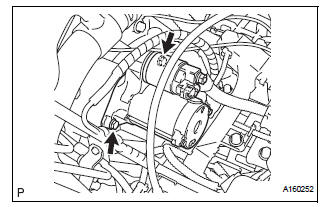
(c) Remove the 2 bolts and the starter.
 Starter
Components
...
 Disassembly
1. Remove repair service starter kit
(a) Remove the nut and disconnect the lead wire from
the repair service starter kit.
(b) Remove the 2 screws which are used to secure the
repair servic ...
Other materials:
Engine Coolant Temperature Circuit Range / Performance Problem
DESCRIPTION
Refer to DTC P0115 (See page ES-133).
MONITOR DESCRIPTION
The ECT sensor is used to monitor the ECT. The ECT sensor has a built-in
thermistor with a resistance
that varies according to the temperature of the engine coolant. When the ECT
becomes low, the
resistance of the ...
Terminals of ECU
1. CHECK DRIVER SIDE J/B ASSEMBLY (MULTIPLEX NETWORK BODY ECU)
Disconnect the B6, 1C, 1K and 1L J/B connectors.
Measure the voltage and resistance according to
the value(s) in the table below.
HINT:
If the result is not as specified, there may be a
malfunction on the w ...
Listening to a
USB memory device
Connecting a USB memory device enables you to enjoy music
from the vehicle speakers.
Touch “USB� on the audio source selection screen.
Connecting a USB memory device
Audio control screen
Pressing the “AUDIO� button displays the audio control screen from
any screens of the selected so ...
