
Toyota Sienna Service Manual: Disassembly
1. Remove repair service starter kit
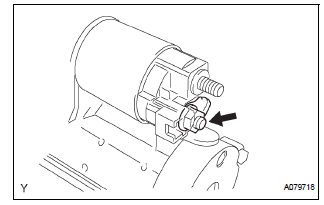
(a) Remove the nut and disconnect the lead wire from the repair service starter kit.
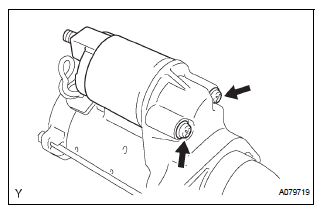
(b) Remove the 2 screws which are used to secure the repair service starter kit to the repair service starter kit.
(c) Remove the repair service starter kit.
(d) Remove the return spring and the plunger from the repair service starter kit.
2. REMOVE STARTER YOKE ASSEMBLY
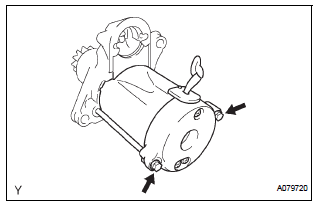
(a) Remove the 2 through bolts and pull out the starter yoke together with the starter commutator end frame.
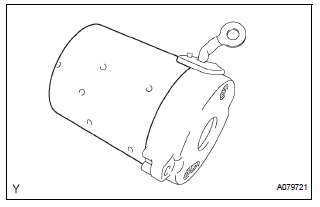
(b) Remove the starter yoke from the starter commutator end frame.
3. REMOVE STARTER ARMATURE PLATE
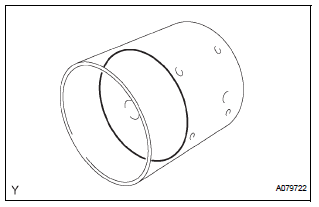
(a) Remove the starter armature plate from the starter yoke.
4. REMOVE DRIVE HOUSING STARTER BEARING COVER
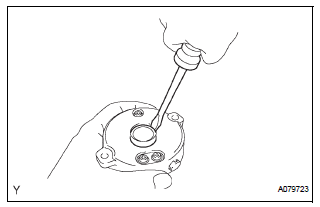
(a) Using a screwdriver, remove the drive housing starter bearing cover.
5. REMOVE STARTER ARMATURE ASSEMBLY
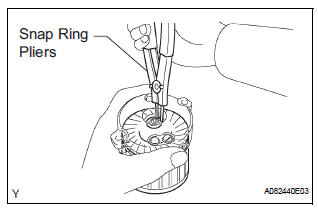
(a) Using snap ring pliers, remove the snap ring and plate washer.
(b) Remove the starter armature from the commutator end frame.
6. REMOVE PLANETARY GEAR
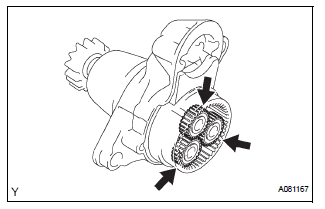
(a) Remove the 3 planetary gears from the repair service starter kit.
 Removal
1. REMOVE BATTERY (See page EM-26)
2. REMOVE NO. 2 AIR CLEANER INLET (See page EM-
28)
3. REMOVE AIR CLEANER CAP SUB-ASSEMBLY (See
page FU-13)
4. REMOVE AIR CLEANER FILTER ELEMENT (See page
EM-2 ...
 Inspection
1. Inspect starter assembly
NOTICE:
These tests must be performed within 3 to 5 seconds
to avoid burning out the coil.
(a) Perform the pull-in test.
(1) Disconnect the lead ...
Other materials:
Intake Air Temperature Circuit
DESCRIPTION
The Intake Air Temperature (IAT) sensor, mounted on the Mass Air Flow (MAF)
meter, monitors the IAT.
The IAT sensor has a built-in thermistor with a resistance that varies according
to the temperature of the
intake air. When the IAT is low, the resistance of the thermistor i ...
CD Sound Skips
INSPECTION PROCEDURE
1 CHECK CD
Check the CD.
OK:
The CD is clean.
HINT:
If dirt is on the CD surface, wipe it clean with a soft cloth
from the inside to the outside in a radial direction.
NOTICE:
Do not use a conventional record cleaner or antistatic
preservative.
2 CHECK CD
...
Removal
1. DRAIN BRAKE FLUID
NOTICE:
Wash brake fluid off immediately if it adheres to any
painted surface.
2. DISCONNECT BATTERY NEGATIVE TERMINAL
3. REMOVE AIR CLEANER ASSEMBLY WITH HOSE
4. REMOVE BRAKE ACTUATOR WITH BRACKET
(a) Release the latch of the brake actuator connector to
disconnect t ...
