
Toyota Sienna 2010-2026 Owners Manual: Setting the vehicle speed
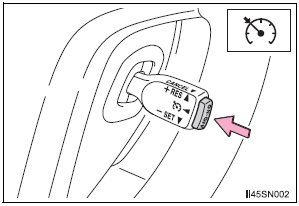
- Press the “ON-OFF� button to
activate the cruise control.
Cruise control indicator will come on*1 or will be displayed on the multi-information display*2.
Press the button again to deactivate the cruise control.
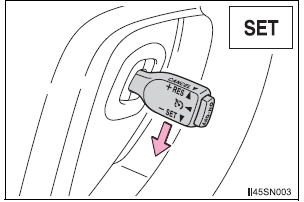
- Accelerate or decelerate the
vehicle to the desired speed,
and push the lever down to set
the speed.
“SET� indicator will come on*1 or will be displayed on the multi-information display*2.
The vehicle speed at the moment the lever is released becomes the set speed.
*1: Vehicles with monochrome display *2: Vehicles with color display
 Summary of functions
Use cruise control to maintain a set speed without depressing the
accelerator pedal.
Indicators
Cruise control switch
...
 Adjusting the set speed
To change the set speed, operate the lever until the desired set speed
is obtained.
Increases the speed
Decreases the speed
Fine adjustment: Momentarily
move the lever in the desired di ...
Other materials:
Air Intake Control Circuit
DESCRIPTION
The air cleaner is equipped with two inlets, one of which is opened or closed
by the Air Intake Control
Valve (AICV). This system reduces intake noise and increases engine power at
low-to-high engine speed
range.
When the engine is operating in the low-to-mid speed range, this ...
Fuel Pump Control Circuit
DESCRIPTION
The FUEL PUMP relay switches the fuel pump speed according to the engine
conditions. The fuel pump
operates when the ECM receives the starter-operating signal (STA) and
crankshaft-rotating signal (NE).
The FUEL PUMP relay is turned ON while the engine is idling or operating at l ...
Casual speech recognization
Due to natural language speech recognition technology, this system
enables recognition of a command when spoken naturally. However,
the system cannot recognize every variation of each command.
In some situations, it is possible to omit the command for the procedure
and directly state the desir ...
