
Toyota Sienna Service Manual: Taillight Relay Circuit
DESCRIPTION
The Multiplex network body ECU controls TAIL relay when signal is received from headlight dimmer switch assembly.
WIRING DIAGRAM
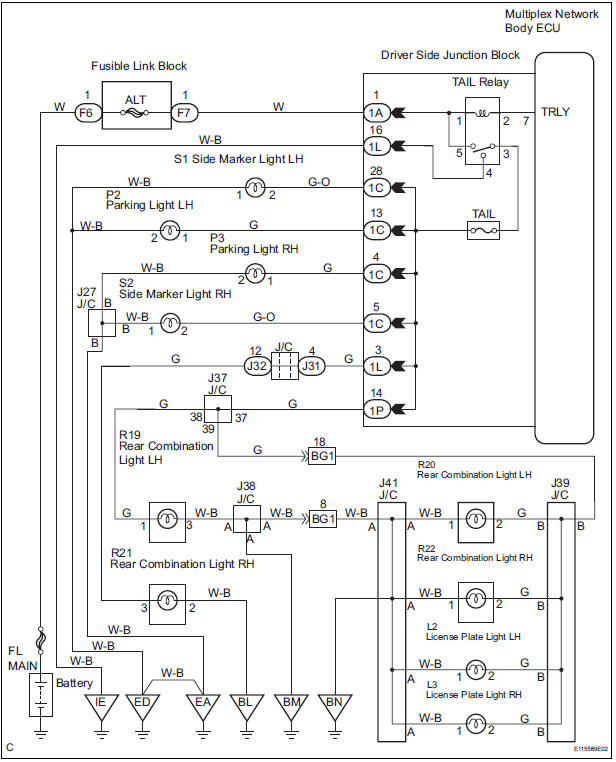
INSPECTION PROCEDURE
1 PERFORM ACTIVE TEST BY INTELLIGENT TESTER
- Connect the intelligent tester to DLC3.
- Turn the ignition switch ON and push the intelligent tester main switch ON.
- Select the item below in the ACTIVE TEST and then check that the relay operates.
BODY NO.1:

2 INSPECT TAIL LIGHT RELAY
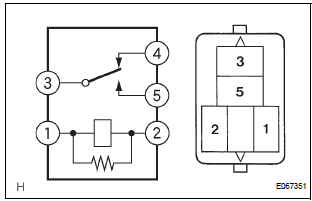
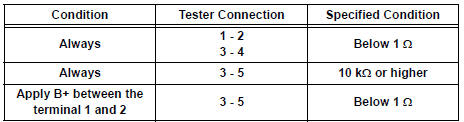
- Inspect tail light relay continuity.
Resistance
3 INSPECT INSTRUMENT PANEL JUNCTION BLOCK ASSEMBLY
- Measure voltage between the terminal 1A-1 and body ground.
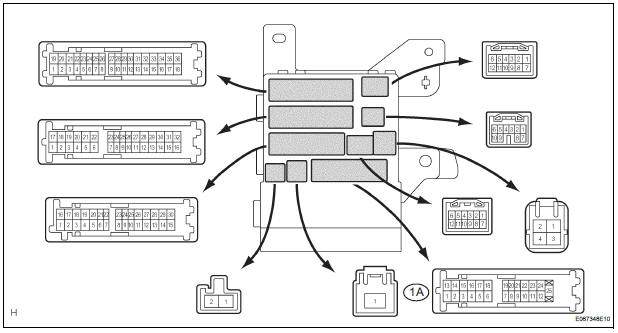
Resistance

4 INSPECT INSTRUMENT PANEL JUNCTION BLOCK ASSEMBLY
- Measure voltage between the each of terminals as shown in the chart below
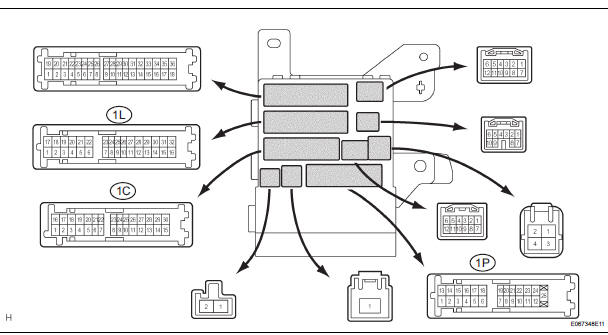
Voltage

PROCEED TO NEXT CIRCUIT INSPECTION SHOWN IN PROBLEM SYMPTOMS TABLE
 Parking Brake Switch Circuit
DESCRIPTION
The Multiplex network body ECU receives parking brake switch signal.
WIRING DIAGRAM
INSPECTION PROCEDURE
1 READ VALUE OF INTELLIGENT TESTER
Connect the intelligent tester to DL ...

Other materials:
Initialization
HINT:
The seatback position is initialized at the factory before
shipment, so initialization is not normally required.
There is an initialization function for cases when
reinitialization is required.
Before performing initialization procedure and initialization
release step ...
Engine unit
COMPONENTS
...
Operation check
1. REMOVE CHECK FUNCTION
Check that the key reminder warning buzzer
sounds.
With the driver side door closed, insert the key
into the ignition key cylinder and then turn the
key to LOCK or ACC.
Check that the buzzer sounds intermittently if
the driver side door ...
