
Toyota Sienna Service Manual: Terminals of ECU
1. CHECK DRIVER SIDE J/B ASSEMBLY (MULTIPLEX NETWORK BODY ECU)
- Disconnect the 1C, 1J, 1L, 1K, 1P, B6, B7 and B9 J/ B connectors.
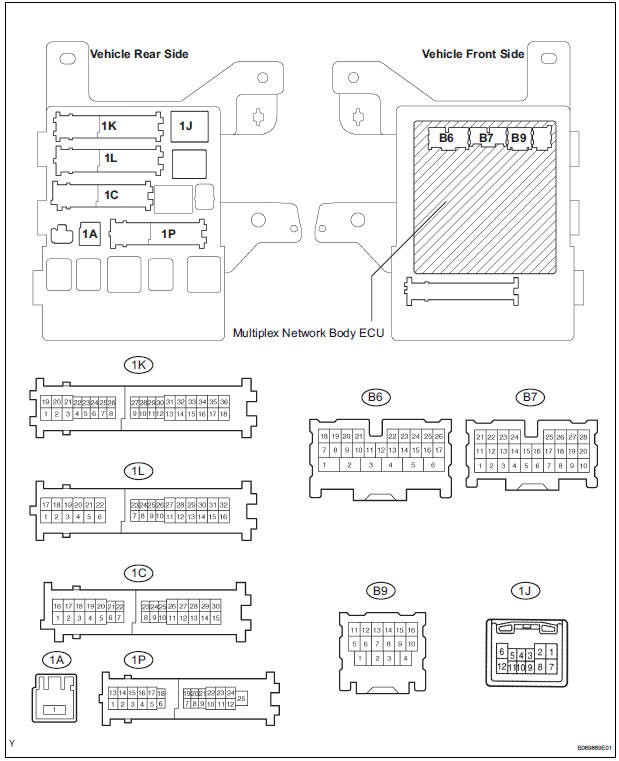
- Measure the voltage and resistance according to the value(s) in the table below.
Standard
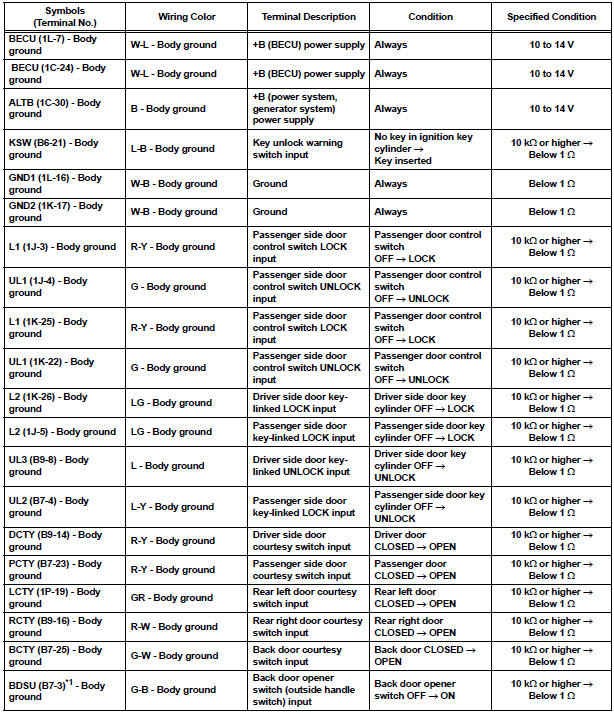
HINT:
- If the result is not as specified, there may be a malfunction on the wire harness side.
- *1: w/o Power back door
- Reconnect the J/B and ECU connectors and measure the voltage according to the value(s) in the table below.
Standard voltage
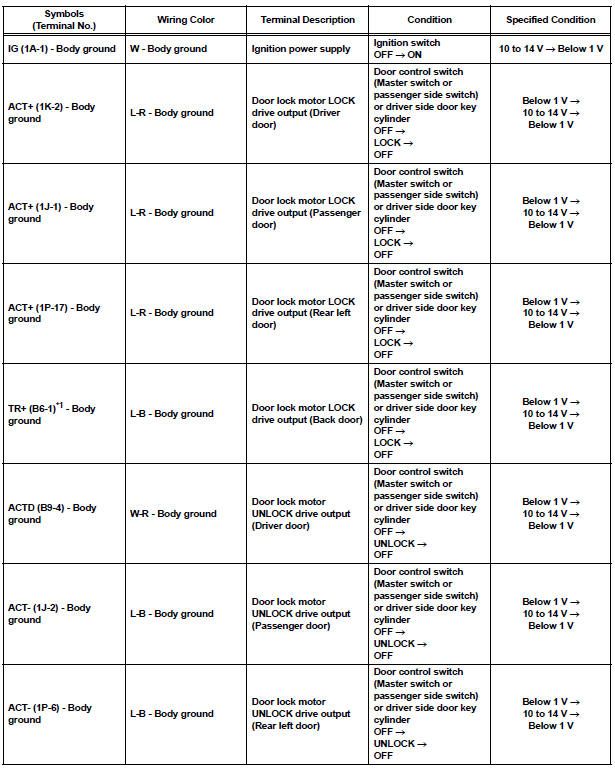
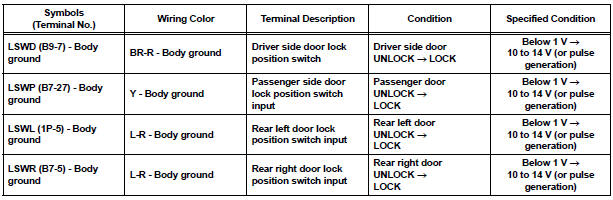
HINT:
- *1: w/o Power Back Door
- Use an oscilloscope to check the output voltages of terminals LSWD, LSWP, LSWL and LSWR.
- If the result is not as specified, the J/B (body ECU) may have a malfunction.
2. CHECK POWER BACK DOOR ECU (w/ Power back door system)
- Disconnect the P13 and P14 ECU connectors.
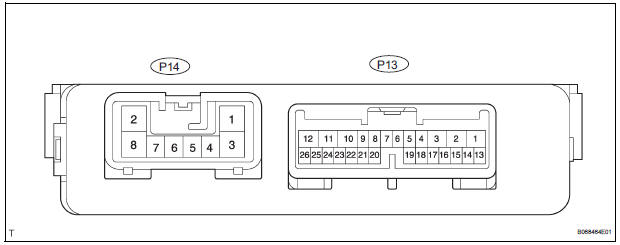
- Measure the voltage and resistance according to the value(s) in the table below.
Standard
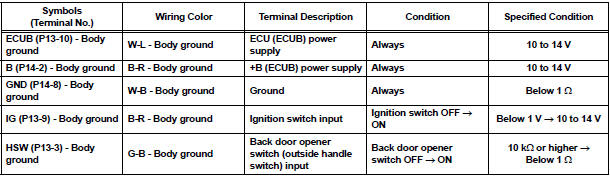
HINT: If the result is not as specified, there may be a malfunction on the wire harness side.
- Reconnect the ECU connectors and measure the voltage according to the value(s) in the table below.
Standard voltage

HINT: If the result is not as specified, the ECU may have a malfunction.
 Problem symptoms table
HINT:
Inspect the fuse and relay before investigating the suspected
areas shown in the table below.
POWER DOOR LOCK CONTROL SYSTEM
...
 Diagnosis system
1. CHECK DLC3
The vehicle's ECU uses ISO 15765-4 for
communication protocol. The terminal arrangement
of the DLC3 complies with SAE J1962 and matches
the ISO 15765-4 format.
...
Other materials:
Cleaning and protecting
the vehicle interior
The following procedures will help protect your vehicle’s interior
and keep it in top condition:
Protecting the vehicle interior
Remove dirt and dust using a vacuum cleaner. Wipe dirty surfaces
with a cloth dampened with lukewarm water.
Cleaning the leather areas
Remove dirt and dust usin ...
Vanity light
ON-VEHICLE INSPECTION
1. LH VISOR ASSEMBLY
Inspect vanity light resistance.
check that the resistance exists between the
terminal 1 and the terminal 2 when the light is
operated.
Resistance:
OFF (closed):
10 kΩ or higher
ON (opened):
Below 1 Ω
2. RH VISOR ...
Wiper Signal Circuit
DESCRIPTION
The distance control ECU detects wiper operation. If the windshield wipers
operate in the HI or LO mode,
the cruise control is canceled and the warning sound "pong" is emitted once. In
addition, the following
warnings will continue until the cruise control main switch is ...
