
Toyota Sienna Service Manual: Unlock Warning Switch Circuit
DESCRIPTION
The unlock warning switch detects if the key is in the ignition key cylinder.
The unlock warning switch turns on when the key is inserted into the ignition key cylinder and turns off when the key is removed from the cylinder.
The body ECU is connected to the unlock warning switch via terminal KSW and key detection status signals are input to the ECU.
The body ECU applies voltage to the unlock warning switch via terminal KSW. When the unlock warning switch is on (there is continuity between the switch terminals), a signal indicating that the key is in the ignition key cylinder is input to the body ECU. When the switch is off (there is no continuity between the switch terminals), a signal indicating that the key is not in the cylinder is input.
WIRING DIAGRAM
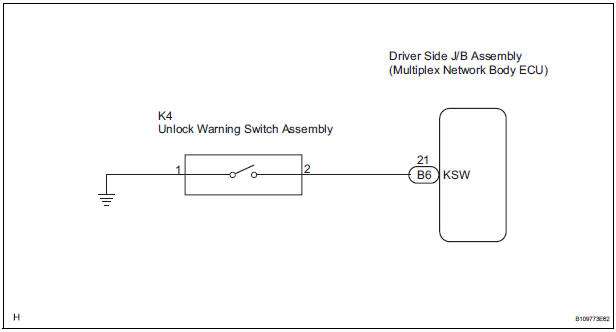
INSPECTION PROCEDURE
1 READ VALUE OF DATA LIST (UNLOCK WARNING SWITCH)
- Check the DATA LIST to ensure proper function of the door unlock detection switch.
BODY:

OK: The display is as specified in the normal condition.
PROCEED TO NEXT CIRCUIT INSPECTION SHOWN IN PROBLEM SYMPTOMS TABLE
2 INSPECT UNLOCK WARNING SWITCH ASSEMBLY
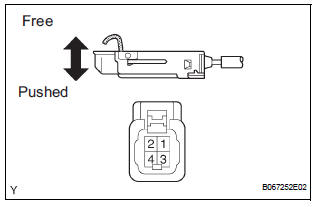
- Remove the unlock warning switch assembly.
- Measure the resistance according to the value(s) in the table below.
Standard resistance

3 CHECK WIRE HARNESS (UNLOCK WARNING SWITCH - DRIVER SIDE J/B)
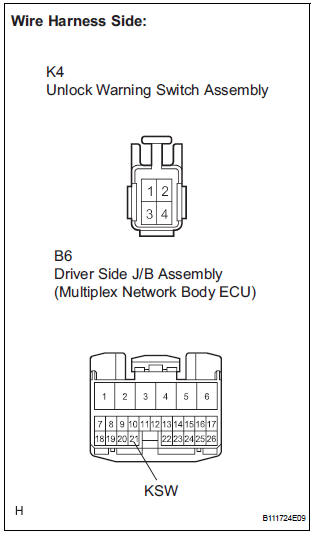
- Disconnect the K4 unlock warning switch assembly connector.
- Disconnect the B6 driver side J/B connector.
- Measure the resistance according to the value(s) in the table below.
Standard resistance

PROCEED TO NEXT CIRCUIT INSPECTION SHOWN IN PROBLEM SYMPTOMS TABLE
 Data list / active test
1. READ DATA LIST
HINT:
Using the intelligent tester's DATA LIST allows switch,
actuator and other item values to be read without
removing any parts. Reading the DATA LIST early in
troubleshootin ...
 Transmitter battery
REPLACEMENT
1. REMOVE TRANSMITTER BATTERY
NOTICE:
Special caution should be taken for handling each
component as they are precision electronic
components.
Using a coin or the equiva ...
Other materials:
Radio antenna pole
COMPONENTS
REMOVAL
1. REMOVE PULL TOP ANTENNA POLE SUBASSEMBLY
Remove the pull top antenna pole sub-assembly by
pulling it the arrow direction in the illustration.
INSTALLATION
1. INSTALL PULL TOP ANTENNA POLE SUBASSEMBLY ...
Diagnosis system
1. CHECK DLC3
The vehicle's ECU uses ISO 15765-4 for
communication protocol. The terminal arrangement
of the DLC3 complies with SAE J1962 and matches
the ISO 15765-4 format.
NOTICE:
*: Before measuring the resistance, leave the
vehicle as is for at least 1 minute and do ...
Data list / active test
1. DATA LIST
HINT:
Using the DATA LIST displayed on the intelligent tester,
you can read the value of the switch, sensor, actuator,
etc. without parts removal. Reading the DATA LIST as
the first step of troubleshooting is one way to shorten the
labor time.
Connect the intelligent tester to ...
