
Toyota Sienna 2010-2026 Owners Manual: Voice settings
This screen is used for guidance for voice command systems setting.
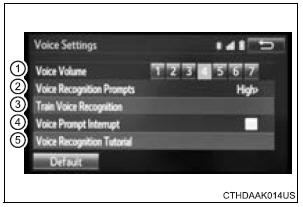
- Adjust the voice guidance volume setting.
- Set the voice recognition prompts “High�, “Low� or “Off�.
- Set the train voice recognition.
- Set the voice prompt interrupt on/off.
- Set the voice recognition tutorial.
To return to the default settings
Select “Default�, and then “Yes�.
 Display settings
Settings are available for adjusting the contrast and brightness
of the screen.
Screen for display settings
Press the “SETUP� button.
Select “Display� on the “Setup� screen.
...

Other materials:
Setting the vehicle speed (vehicle-to-vehicle distance control
mode)
Press the “ON-OFF� button to
activate the cruise control.
Dynamic radar cruise control indicator
will be displayed.
Press the button again to deactivate
the cruise control.
Accelerate or decelerate the
vehicle to the desired speed,
and push the lever down to set
...
Removal
1. PRECAUTION
CAUTION: Be sure to read "PRECAUTION" thoroughly before
servicing.
2. DISCONNECT CABLE FROM NEGATIVE BATTERY
TERMINAL
CAUTION:
Wait for 90 seconds after disconnecting the cable to
prevent the airbag working.
3. REMOVE FRONT SEAT ASSEMBLY (for Manual Seat)
4. REMOVE ...
Touch Panel Switch does not Function
INSPECTION PROCEDURE
1 CHECK TOUCH PANEL
Check for foreign matter on the display.
OK:
The display is clean
2 CHECK TOUCH SWITCH (DISPLAY CHECK MODE)
Enter the "Display Check" mode (Touch Switch Check).
Touch the display in the area where the switch
malfunction o ...
