
Toyota Sienna Service Manual: Back-up light assembly
COMPONENTS
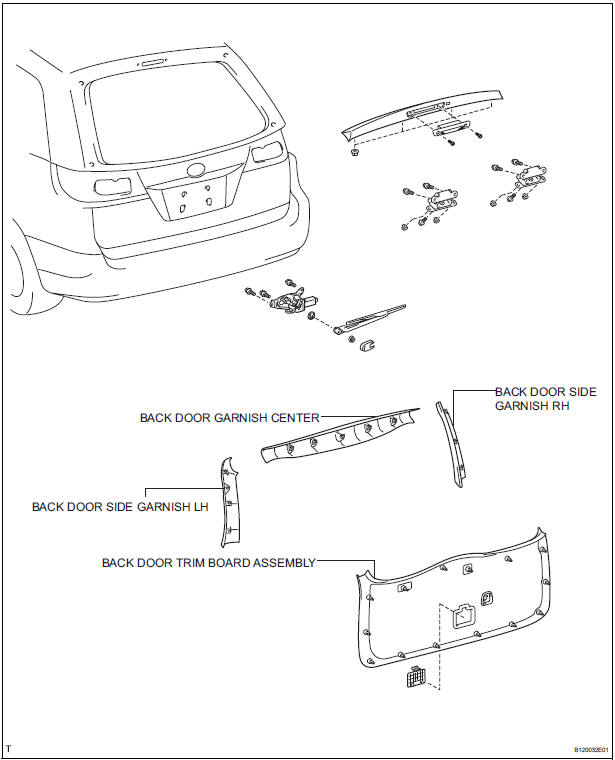
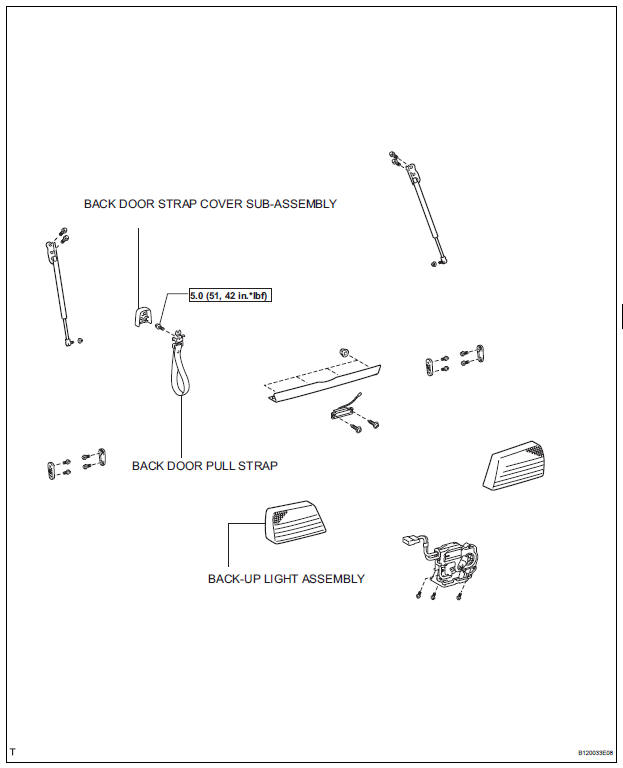
REMOVAL
1. REMOVE BACK DOOR GARNISH CENTER
2. REMOVE BACK DOOR SIDE GARNISH LH
3. REMOVE BACK DOOR SIDE GARNISH RH
4. REMOVE BACK DOOR STRAP COVER SUBASSEMBLY
5. REMOVE BACK DOOR PULL STRAP
6. REMOVE BACK DOOR TRIM BOARD ASSEMBLY
7. REMOVE BACK-UP LIGHT ASSEMBLY
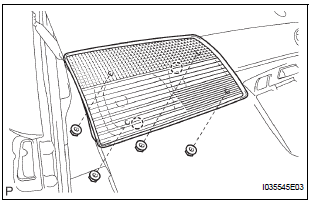
- Disconnect the connector.
- Release the 2 claw fittings and remove the 4 nuts and the back-up light assembly.
DISASSEMBLY
1. REMOVE BACK-UP LIGHT BULB
- Remove the back-up light bulb.
2. REMOVE BACK-UP LIGHT BULB
- Remove the back-up light bulb.
REASSEMBLY
1. INSTALL BACK-UP LIGHT BULB
- Install the back-up light bulb.
2. INSTALL BACK-UP LIGHT BULB
- Install the back-up light bulb.
INSTALLATION
1. INSTALL BACK-UP LIGHT ASSEMBLY
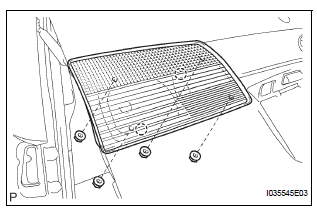
- Connect the connector.
- Install the back-up light assembly with the 4 nuts and 2 claws.
2. INSTALL BACK DOOR TRIM BOARD ASSEMBLY
3. INSTALL BACK DOOR PULL STRAP
4. INSTALL BACK DOOR STRAP COVER
5. INSTALL BACK DOOR SIDE GARNISH RH
6. INSTALL BACK DOOR SIDE GARNISH LH
7. INSTALL BACK DOOR GARNISH CENTER
 Rear combination light assembly
COMPONENTS
REMOVAL
1. DISCONNECT CABLE FROM NEGATIVE BATTERY
TERMINAL
2. REMOVE REAR COMBINATION LIGHT ASSEMBLY
Remove the 2 bolts.
Disengage the 2 pins and separate the ...
 License plate light assembly
COMPONENTS
REMOVAL
1. REMOVE BACK DOOR GARNISH CENTER
2. REMOVE BACK DOOR SIDE GARNISH LH
3. REMOVE BACK DOOR SIDE GARNISH RH
4. REMOVE BACK DOOR STRAP COVER
5. REMOVE BACK DOOR PULL STR ...
Other materials:
Communication Error from ECM to VSC
DTC P1631 Communication Error from ECM to VSC
DTC U0100 Lost Communication with ECM/PCM "A"
DESCRIPTION
The ECM sends signals such as A/T information signals, dynamic laser cruise
control operation signals,
brake operation demand signals, and buzzer operation demand signals to the sk ...
Correct use of the seat belts
Make sure that all occupants are wearing their seat belts before driving
the vehicle. Use a child restraint system appropriate for the child until the child
becomes large enough to properly wear the vehicle’s seat belt.
Adjusting the mirrors
Make sure that you can see backward clearly by adjus ...
Evaporative Emission Control System Leak
Detected
DTC P0455 Evaporative Emission Control System Leak
Detected (Gross Leak)
DTC P0456 Evaporative Emission Control System Leak
Detected (Very Small Leak)
DTC SUMMARY
DESCRIPTION
The circuit description can be found in the EVAP (Evaporative Emission)
System.
INSPECTION PROCEDURE
Refer to t ...
