
Toyota Sienna Service Manual: License plate light assembly
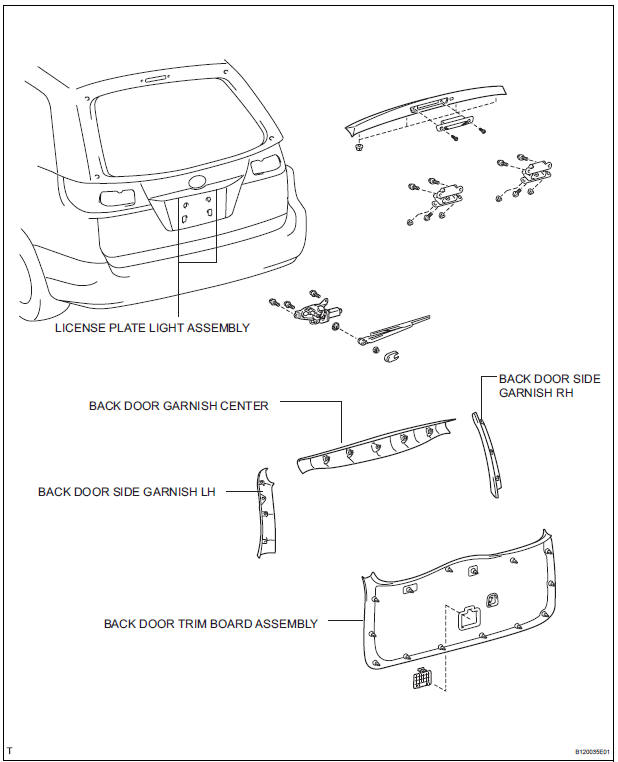
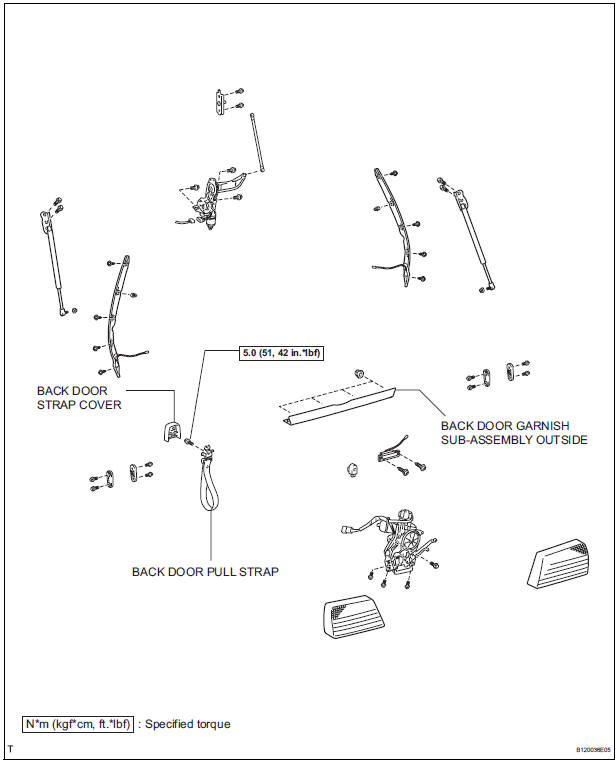
COMPONENTS
REMOVAL
1. REMOVE BACK DOOR GARNISH CENTER
2. REMOVE BACK DOOR SIDE GARNISH LH
3. REMOVE BACK DOOR SIDE GARNISH RH
4. REMOVE BACK DOOR STRAP COVER
5. REMOVE BACK DOOR PULL STRAP
6. REMOVE BACK DOOR TRIM BOARD ASSEMBLY
7. REMOVE BACK DOOR GARNISH SUB-ASSEMBLY OUTSIDE
8. REMOVE LICENSE PLATE LIGHT ASSEMBLY
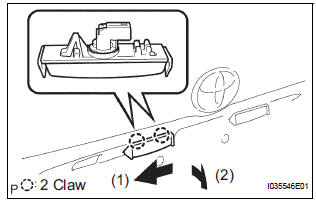
- Release the 2 claw fittings and disconnect the license plate light assembly.
- Disconnect the connector and remove the license plate light assembly.
DISASSEMBLY
1. REMOVE LICENSE PLATE LIGHT LENS GASKET
2. REMOVE LICENSE PLATE LIGHT BULB
- Remove the license plate light bulb and the license plate light socket plug.
- Remove the license plate light bulb from the license plate light socket plug.
3. REMOVE LICENSE PLATE LIGHT SOCKET PLUG
4. REMOVE LICENSE PLATE LIGHT LENS
REASSEMBLY
1. INSTALL LICENSE PLATE LIGHT LENS
2. INSTALL LICENSE PLATE LIGHT SOCKET PLUG
3. INSTALL LICENSE PLATE LIGHT BULB
4. INSTALL LICENSE PLATE LIGHT LENS GASKET
INSTALLATION
1. INSTALL LICENSE PLATE LIGHT ASSEMBLY
2. INSTALL BACK DOOR GARNISH SUB-ASSEMBLY OUTSIDE
3. INSTALL BACK DOOR TRIM BOARD ASSEMBLY
4. INSTALL BACK DOOR PULL STRAP
5. INSTALL BACK DOOR STRAP COVER
6. INSTALL BACK DOOR SIDE GARNISH RH
7. INSTALL BACK DOOR SIDE GARNISH LH
8. INSTALL BACK DOOR GARNISH CENTER
 Back-up light assembly
COMPONENTS
REMOVAL
1. REMOVE BACK DOOR GARNISH CENTER
2. REMOVE BACK DOOR SIDE GARNISH LH
3. REMOVE BACK DOOR SIDE GARNISH RH
4. REMOVE BACK DOOR STRAP COVER SUBASSEMBLY
5. REMOVE BACK D ...
 High mounted stop light assembly
COMPONENTS
REMOVAL
1. REMOVE BACK DOOR GARNISH CENTER (w/ Rear Spoiler)
2. REMOVE REAR SPOILER COVER (w/ Rear Spoiler)
3. REMOVE CENTER STOP LIGHT ASSEMBLY
w/o Rear spoiler:
...
Other materials:
Removal
1. REMOVE ENGINE AND TRANSAXLE
HINT:
(See page EM-26)
2. REMOVE AUTOMATIC TRANSMISSION WITH
TRANSFER
HINT:
(See page AX-164)
3. REMOVE NO. 1 TRANSFER CASE PLUG
(a) Remove the No. 1 transfer case plug.
(b) Remove the No. 1 gasket from the transfer case No.
1 plug.
4. REMOVE NO. 2 T ...
Scratched / Reversed Disc
DTC 62-46 Scratched / Reversed Disc
DTC 63-46 Scratched / Reversed Disc
DESCRIPTION
DTC No.
DTC Detecting Condition
Trouble Area
62-46
Scratches or dirt is found on CD surface or CD is set
upside down.
CD
Radio receiver
...
Rear Clearance Sonar Sensor LH Circuit
DESCRIPTION
An ultrasonic sensor consists of a sensor portion that transmits and receives
ultrasonic waves and a preamplifier
that amplifies them. The ultrasonic sensor outputs the ultrasonic waves and
sends the received
signals to the clearance warning ECU.
WIRING DIAGRAM
INSPECTION PR ...
