
Toyota Sienna Service Manual: Cruise Main Indicator Light Circuit
DESCRIPTION
When the cruise control main switch is on, the CRUISE main indicator light and READY indicator light come on. This indicates the control condition (presence or absence of a vehicle in front, vehicle-to-vehicle distance, and set vehicle speed) and fail-safe state through the multiplex communication system. The master warning light and CRUISE main indicator light come on and vehicle-to-vehicle distance information is displayed on the combination meter as the alarm buzzer sounds.
HINT: If the vehicle in front in the same lane significantly decreases vehicle speed or another vehicle cuts in front of your vehicle, adequate deceleration cannot be applied and the vehicle-to-vehicle distance will shorten. At this time, the system sounds the buzzer and the multi-information display blinks to warn the driver.
INSPECTION PROCEDURE
1 PERFORM ACTIVE TEST BY INTELLIGENT TESTER
- Connect the intelligent tester to the DLC3.
- Select the ACTIVE TEST, use the intelligent tester to generate a control command, and then check that the CRUISE main indicator light blinks.
METER:

OK: Indicator light blinks/goes off.
2 READ VALUE OF INTELLIGENT TESTER
- Connect the intelligent tester to the DLC3.
- Turn the ignition switch to the ON position, and turn the intelligent tester main switch on.
- Check the DATA LIST for proper functioning of the CRUISE main indicator light.
ECM (Cruise control):
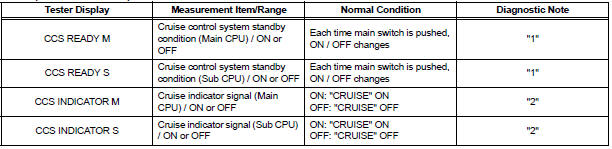
OK: When the cruise control main switch is operated, the display changes as shown above.
HINT: "1" is OK, but "2" is NG → DTC output or ECM failure
PROCEED TO NEXT CIRCUIT INSPECTION SHOWN IN PROBLEM SYMPTOMS TABLE
 Washer Signal Circuit
DESCRIPTION
The distance control ECU detects washer operation. The cruise control will be
cancelled by the distance
control ECU if the windshield wipers operate in the HI or LO mode. By detecting ...
 TC and CG Terminal Circuit
DESCRIPTION
Connecting terminals TC and CG of the DLC3 causes the system to enter the
self-diagnostic mode. If a
malfunction is present, DTCs will be output.
HINT:
When a particular warning ligh ...
Other materials:
Rear Blower Motor Circuit
DESCRIPTION
Power to the rear blower motor is supplied from the battery via the RR A/C
relay.
The rear blower motor speed level varies between 0 and 31 based on the voltage
difference measured
between the terminals of the motor.
The voltage difference measured between the terminals of th ...
Reassembly
1. INSTALL FRONT SEAT CUSHION SHIELD LOWER LH
Install the front seat cushion shield lower LH.
2. INSTALL FRONT SEAT CUSHION SHIELD LOWER
RH
3. INSTALL RECLINING ADJUSTER INSIDE COVER LH
Install the reclining adjuster inside cover LH (upper)
with the screw.
4. INSTALL RE ...
Monitor drive pattern
1. MONITOR DRIVE PATTERN FOR ECT TEST
(a) Perform this drive pattern as one method to
simulate the detection conditions of the ECT
malfunctions. (The DTCs may not be detected due
the actual driving conditions. And some codes may
not be detected through this drive pattern.)
HINT:
Preparation f ...
