
Toyota Sienna Service Manual: Data list / active test
1. USING INTELLIGENT TESTER
- Connect the intelligent tester to the DLC3.
- Monitor the ECU data by following the prompts on the tester screen.
HINT: The intelligent tester has a "Snapshot" function which records the monitored data. Refer to the intelligent tester operator's manual for further details.
2. DATA LIST
HINT: Using the DATA LIST displayed on the intelligent tester, you can read the value of the switch, sensor, actuator, etc. without parts removal. Reading the DATA LIST as the first step of troubleshooting is one way to shorten the labor time.
- Connect the intelligent tester to the DLC3.
- Ignition switch on.
- Enter the following menus: DIAGNOSIS / ENHANCED OBD II / DATA LIST.
- Read the DATA LIST according to the display on the tester.
MIRROR-L/MIRROR-R
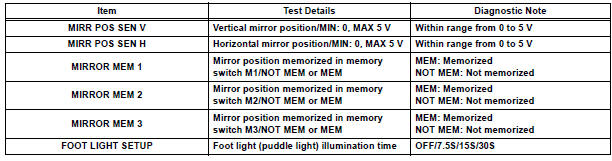
D-SEAT
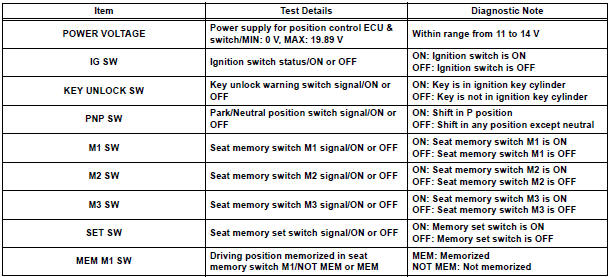
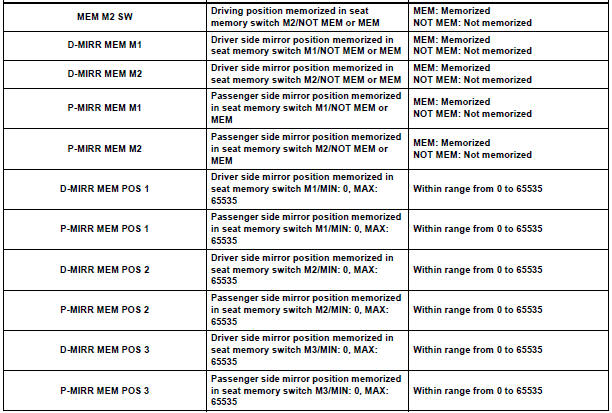
BODY
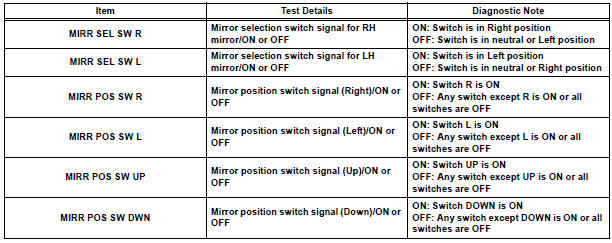
3. ACTIVE TEST
HINT: Performing the ACTIVE TEST using the intelligent tester allows you to operate the relay, VSV, actuator, etc.
without parts removal. Performing the ACTIVE TEST as the first step of troubleshooting is one way to shorten the labor time. It is possible to display the DATA LIST during the ACTIVE TEST.
- Connect the intelligent tester to the DLC3.
- Ignition switch on.
- Enter the following menus: DIAGNOSIS / ENHANCED OBD II / ACTIVE TEST.
- Perform the ACTIVE TEST according to the display on the tester.
MIRROR-L/MIRROR-R

 Diagnosis system
1. DESCRIPTION
When troubleshooting a vehicle with the diagnosis
system, the only difference from the usual
troubleshooting procedure is connecting the
intelligent tester to the vehicl ...
 On-vehicle inspection
1. CHECK POWER MIRROR SWITCH OPERATION
Remote control
The mirror adjust switch can control the adjustment
axis of the mirror surface.
Reverse-linked
This function tilts the mir ...
Other materials:
SRS airbags
The SRS airbags inflate when the vehicle is subjected to certain
types of severe impacts that may cause significant injury to the
occupants. They work together with the seat belts to help reduce
the risk of death or serious injury.
SRS front airbags
SRS driver airbag/front passenger ...
Removal
1. REMOVE TRANSFER CASE NO.1 PLUG (See page
TF-8)
2. REMOVE TRANSFER DRAIN PLUG
(a) Remove the transfer drain plug, drain gasket and
bleed transfer oil.
3. REMOVE EXHAUST PIPE ASSEMBLY
HINT:
(See page EX-8)
4. REMOVE PROPELLER WITH CENTER BEARING
SHAFT ASSEMBLY
HINT:
(See page PR-3)
5. R ...
On-vehicle inspection
1. CHECK AUTO SLIDE-OPEN / CLOSE FUNCTION
Check that the sliding roof switch can operate the
sliding roof glass as follows while the tilt-up / DOWN
function is not operating.
Standard
HINT:
The sliding roof stops partway when the sliding roof
switch is pushed on either side during AU ...
