
Toyota Sienna Service Manual: Definition of terms
|
Terms |
Definitions |
| Monitor Description | Description of what ECM monitors and how to detect malfunctions (monitoring purpose and details). |
| Related DTCs | A group of diagnostic trouble codes that are output by ECM based on the same malfunction detection logic. |
| Typical Enabling Conditions | Preconditions that allow ECM to detect malfunction.
With all preconditions satisfied, ECM sets DTC when monitored value(s) exceeds malfunction threshold(s). |
| Sequence of Operation | Order of monitor priority, applied if multiple sensors and
components are involved in single malfunction detection
process.
Each sensor and component monitored in turn and not monitored until previous detection operation is completed. |
| Required Sensors / Components | Sensors and components used by ECM to detect each malfunction. |
| Frequency of Operation | Number of times ECM checks for each malfunction during each driving
cycle.
"Once per driving cycle" means ECM performs checks for that malfunction only once in single driving cycle. "Continuous" means ECM performs checks for that malfunction whenever enabling conditions are met. |
| Duration | Minimum time for which ECM must detect continuous deviation in monitored value(s) in order to set DTC. Timing begins when typical enabling conditions are met. |
| Malfunction Thresholds | Values, beyond which, ECM determines malfunctions exist and sets DTCs. |
| MIL Operation | Timing of MIL illumination after defect is detected.
"Immediate" means ECM illuminates MIL as soon as malfunction is detected. "2 driving cycles" means ECM illuminates MIL if the same malfunction is detected twice during the next sequential driving cycle. |
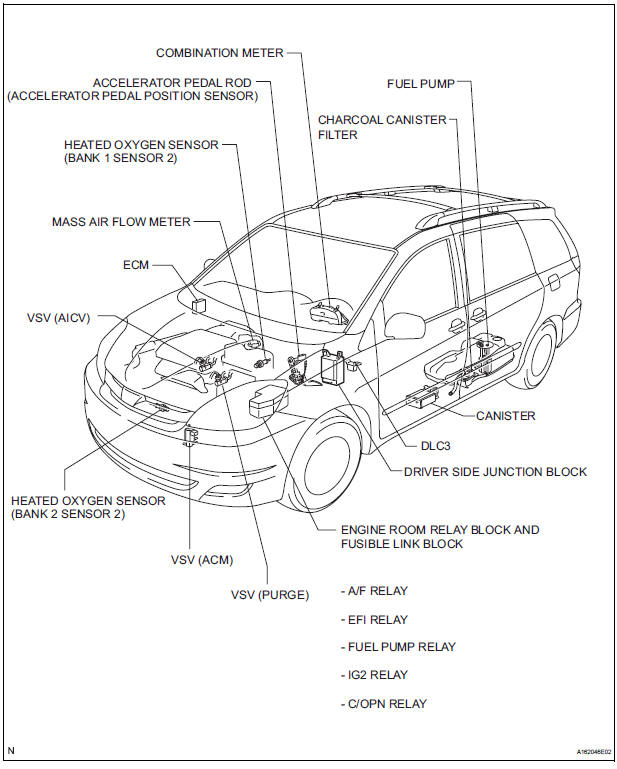
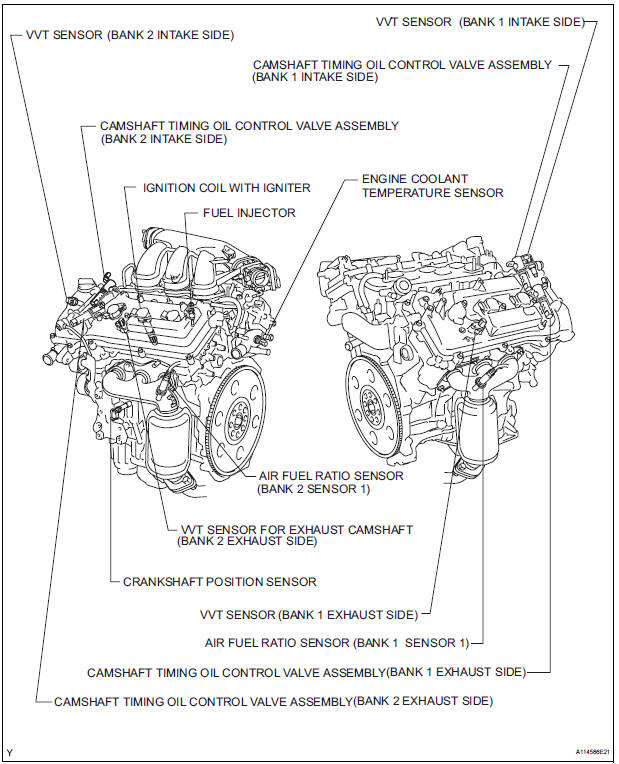
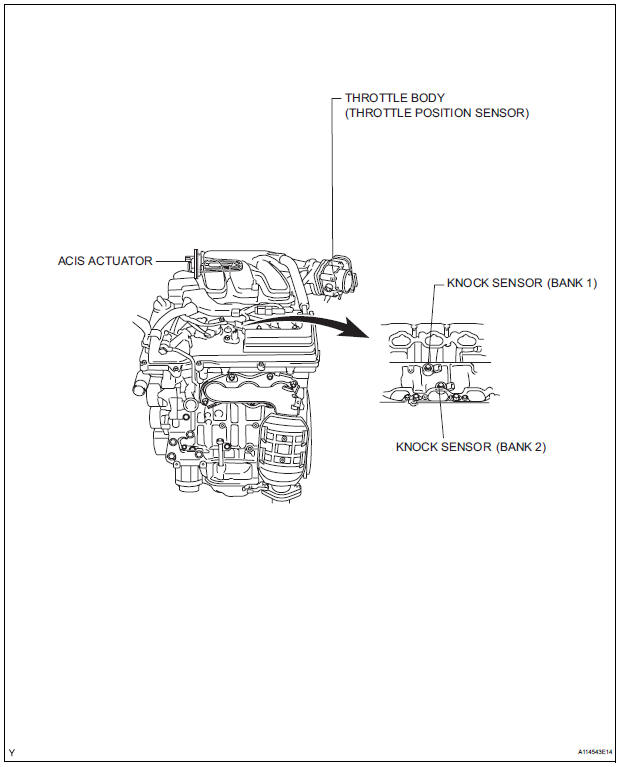
PARTS LOCATION
 Precaution
1. INITIALIZATION
NOTICE:
Perform RESET MEMORY (AT initialization) when
replacing the automatic transaxle assembly, engine
assembly or ECM (See page AX-16).
Perform REGISTRATIO ...
 System diagram
...
Other materials:
Data list / active test
1. DATA LIST
HINT:
By the DATA LIST displayed by the intelligent tester, you
can read the value of the switch, sensor, actuator and so
on without removing any part. Reading the DATA LIST
as the first step in troubleshooting is one of the methods
to shorten the labor time.
Connect the ...
Disassembly
1. REMOVE LOWER BALL JOINT ASSEMBLY FRONT LH
(a) Remove the cotter pin and nut.
(b) Using SST(s), remove the lower ball joint assembly
front LH.
SST 09628-62011
2. REMOVE FRONT WHEEL BEARING DUST DEFLECTOR NO.1 LH
(a) Using a screwdriver, remove the bearing dust
deflector NO. 1 LH ...
Problem symptoms table
HINT:
Proceed to the troubleshooting for each circuit in the table
below.
AIRBAG SYSTEM
Symptom
Suspected Area
The SRS warning light goes off after the primary
check, but then comes on.
SRS Warning Light Remains ON
When the ignition switch is turned to t ...
